
myArbrea is Arbrea’s powerful marketing and communication tool that allows you to connect with patients before, during, and after consultations. To begin using myArbrea, you’ll need to request its activation directly through Arbrea Suite.
This step-by-step guide walks you through the simple process.
Open Arbrea Suite #
Launch the Arbrea Suite app on your iPad to access your integrated tools and settings.
Click myArbrea #
From the main dashboard, tap the myArbrea button to enter the myArbrea interface.

Go to Settings #
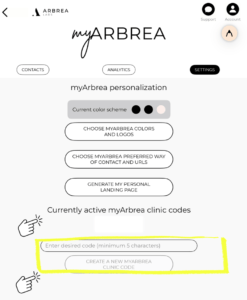
In the myArbrea menu, navigate to the Settings section where configuration options are available.

Click Create A New myArbrea Code #
Tap on the “Create A New myArbrea Code” option to start the activation process.
Conclusion #
Activating myArbrea takes just a few minutes and unlocks a suite of features designed to boost your digital presence, improve patient communication, and streamline your consultations. Don’t miss out—request your activation today and start transforming your practice with myArbrea.




 English
  Portuguese
  Italian
  Spanish
  German
  Arabic
  French
  Korean
  Albanian
  Thai
Thai  Hindi
Hindi  Vietnamese
  Japanese