
Arbrea Suite features an advanced Capture Tool, enabling plastic surgeons to create high-quality 3D models for full-body simulations with precision. This tool ensures optimal body imaging for pre-operative planning, body contouring consultations.
Accessing the Capture Feature #
-
Open Arbrea Suite and navigate to the Arbrea Body Capture Tool.
-
Ensure the camera is properly positioned to capture clear full-body patient images from head to toe.
Why It’s Important? #
-
Provides a structured approach for capturing high-quality images of the torso, abdomen, and limbs.
-
Ensures accurate simulation results for procedures like liposuction, tummy tucks, or fat grafting during consultations.
Taking the Perfect Patient Image #
-
Ensure proper lighting – Use bright, even lighting to avoid shadows that can interfere with AI depth perception.
-
Position the patient in a neutral posture – The patient should stand with feet shoulder-width apart and arms slightly away from the body (A-pose) for better contour visualization.
-
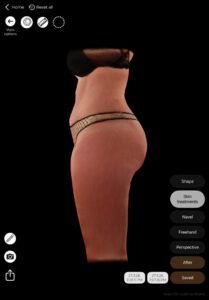
Follow on-screen guides to take frontal, back, and both profile views.
Benefit:
Helps create consistent, high-quality 3D avatars for AI-powered body simulations, ensuring the patient’s unique anatomy is preserved.
Conclusion #
Arbrea Body enhances image quality, simulation accuracy, and consultation efficiency. By following structured body imaging techniques and proper neutral positioning, surgeons can improve patient communication and set realistic expectations for body reshaping procedures.
Arbrea Body allows you and the patients to visualize realistic body outcomes before the consultation, so patients are prepared to move forward.




 English
  Portuguese
  Italian
  Spanish
  German
  Arabic
  French
  Korean
  Albanian
  Thai
Thai  Hindi
Hindi  Vietnamese
  Japanese