
Arbrea Suite integrates with myArbrea, allowing plastic surgeons to import patient models and simulations efficiently. This feature streamlines the consultation workflow, improves patient communication, and ensures high-quality simulations for pre-operative planning.
Sharing Has Never Been Easier #
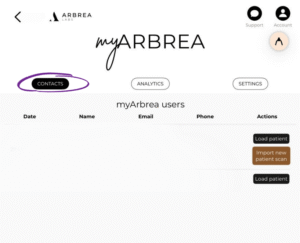
With myArbrea, your patient can now share their simulation directly to the Arbrea Suite app, you’ll then be able to access it right away within the Suite at myArbrea section. The other option is to import it manually, by going through the Patient List and adding the file or backup, as explained below.
 #
#
How to Import the Simulation from myArbrea to Arbrea Suite #
- Open Arbrea Suite and go to the Patient List.
- Click on the patient and you’ll see Add Patients from File or Backup.
- Choose the patient’s uploaded images.
- The system will automatically load the images into the simulation environment.
This eliminates redundant image uploads and provides a seamless connection between myArbrea and Arbrea Suite.
Choosing Image Quality When Importing #
When importing, select the image quality setting:
- Good Quality – Faster processing, recommended for standard consultations.
- Enhanced Quality – Higher resolution, ideal for detailed analysis and presentations.
Once imported, you can begin the simulation process right away within Arbrea Suite. This gives you flexible quality options depending on the consultation’s needs, with enhanced clarity available for precise modifications and surgical planning.
Why Importing from myArbrea Saves Time #
myArbrea lets patients take their own photos and share them directly with the Arbrea Suite app — so there’s no need for new in-clinic photography. Once imported, surgeons can immediately start simulations. This optimizes workflow by reducing in-clinic imaging time and allows for pre-consultation planning, so the surgeon can assess the case before the appointment even begins.
How Importing Improves Communication with Patients #
Because patients can take their own photos via myArbrea and send them ahead of the consultation, surgeons can review, edit, and simulate results in advance — leading to more informed discussions during the actual appointment. Patients also become active participants in their treatment planning, and get a better visual understanding of their expected surgical outcomes.
Summary #
The myArbrea integration in Arbrea Suite simplifies image importation, improves patient communication, and enhances simulation efficiency. Through remote image uploads, seamless data transfers, and flexible quality settings, surgeons can optimize both their pre-operative planning and their consultations.




 English
  Portuguese
  Italian
  Spanish
  German
  Arabic
  French
  Korean
  Albanian
  Thai
Thai  Hindi
Hindi  Vietnamese
  Japanese