
Arbrea Breast offers a powerful Sculpting Mode, allowing plastic surgeons to simulate breast volume adjustments without using implants. This feature provides greater flexibility in shaping and refining results, enabling surgeons to achieve customized pre-operative visualizations based on patient preferences.
Simulating Without Implants Using Sculpting Mode #
- Open Arbrea Breast and select the patient’s 3D model.
- Activate Sculpting Mode to modify breast shape and volume without adding implants.
- Use manual sculpting tools to fine-tune projection, symmetry, and natural contours.
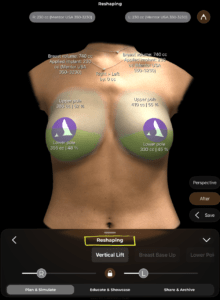
Why It’s Important?
- Allows surgeons to simulate fat grafting, mastopexy, or volume adjustments without implants.
- Provides a natural-looking preview of potential outcomes.
Changing Volume & Using the Shape Tool #
- Navigate to the Volume Adjustment Tool and increase or decrease breast size.
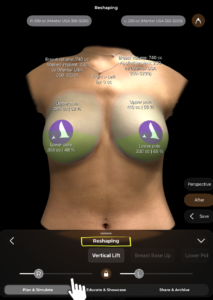
2. Use the Shape Tool to refine the breast base, projection, and overall contour.
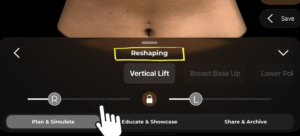
3. Adjust the upper and lower pole fullness to match the desired look.
Benefit:
- Helps visualize subtle refinements and customized shaping.
- Provides a more personalized approach for patients seeking natural enhancement.
Getting Implant Suggestions Based on the Patient’s Preferred Volume #
- Once the preferred volume is set, Arbrea Breast can suggest suitable implants.
- The system analyzes patient-specific measurements and recommends implants that best match the sculpted volume.
- Surgeons can compare implants vs. sculpted results to guide patient decision-making.
Why This Matters?
- Helps patients explore implant vs. natural options.
- Ensures implant selection aligns with the patient’s expectations.
Conclusion #
The Sculpting Mode in Arbrea Breast provides flexible breast shaping and volume adjustments without implants. By utilizing manual sculpting tools, volume refinements, and AI-powered implant suggestions, surgeons can enhance consultations and achieve precise pre-operative planning.
For more guidance, watch the full video tutorial below.





 English
  Portuguese
  Italian
  Spanish
  German
  Arabic
  French
  Korean
  Albanian
  Thai
Thai  Hindi
Hindi  Vietnamese
  Japanese