
Arbrea Face provides an advanced Automatic Measurements Tool, allowing plastic surgeons to analyze facial proportions, angles, and symmetry with precision. This feature automatically updates measurements in real time after any modifications, ensuring accurate pre-operative planning and patient consultations.
Viewing Your Patient from Different Perspectives #
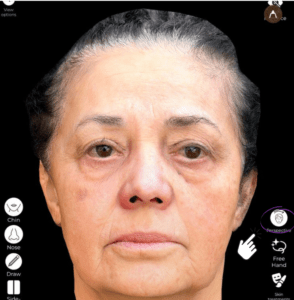
- Open Arbrea Face and load the patient’s 3D facial model.
- Rotate and zoom in to examine the face from multiple angles.
- Use different perspectives to assess symmetry and proportion before proceeding with modifications.
Why It’s Important?
- Helps analyze facial balance and potential areas for enhancement.
- Ensures precise adjustments based on different viewing angles.
Accessing the Upper Menu #
- Locate the Upper Menu in Arbrea Face.
- Click on the Measurements Tool to activate automatic facial analysis.
- The system will display real-time measurements of key facial landmarks.
Benefit:
- Provides instant, AI-powered facial proportions and distances.
- Helps surgeons make data-driven decisions for aesthetic treatments.
Viewing the Patient’s Automatic Face Measurements #
- Once activated, the tool will highlight key facial measurements, including:
- Distance between eyes, nose, and lips.
- Face width and height proportions.
- Symmetry analysis for different regions of the face.
Why This Matters?
- Helps in planning injectables, facelifts, and contouring procedures.
- Identifies asymmetries and disproportions before treatment.
Viewing the Patient’s Face Angles #
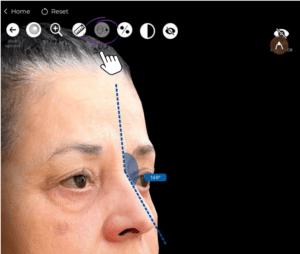
- Navigate to the Angles Tab within the Measurements Tool.
- The system will display key facial angles, such as:
- Jawline and chin angles.
- Forehead to nose inclination.
- Lip-to-chin proportions.
Advantage:
- Assists in rhinoplasty, chin augmentation, and contouring procedures.
- Allows for precise angle modifications based on golden ratio principles.
Automatic Measurement Updates After Every Change #
- Perform any modifications using Arbrea’s simulation tools.
- The Automatic Measurements Tool will instantly recalculate proportions and angles.
- Continue refining results while tracking measurement updates in real time.
Why This Feature is Essential?
- Provides instant feedback on every modification, helping refine procedures.
- Ensures consistent, natural-looking results based on facial proportions.
Conclusion #
The Automatic Measurements Tool in Arbrea Face enhances facial analysis and aesthetic planning with real-time updates, precision measurements, and dynamic angle tracking. By utilizing AI-powered proportions, symmetry analysis, and adaptive measurements, surgeons can optimize consultations and achieve accurate pre-operative planning.
For more guidance, watch the full video tutorial below.





 English
  Portuguese
  Italian
  Spanish
  German
  Arabic
  French
  Korean
  Albanian
  Thai
Thai  Hindi
Hindi  Vietnamese
  Japanese