
Arbrea Body uses a proprietary “Local AI” engine body simulator designed to deliver fast, realistic 3D simulations in real time.
Getting Started #
Before taking measurements, you have two options to get started:
Training Hub – Open the Training Hub if you want to practice on a demo patient first. This is a great way to familiarize yourself with the tools before working with real cases.


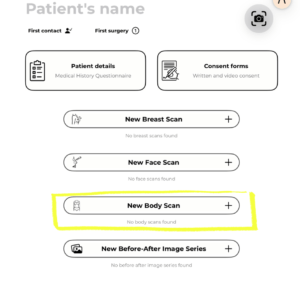
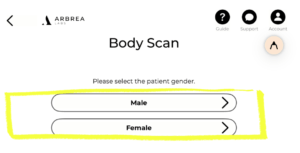
New Patient – If you’re ready to work with a real case, tap New Patient, select New Body Scan, and choose Male or Female. You can either upload existing photos or capture new ones directly in the app. Once your scan is ready, you can begin the simulation and measurements.

Accessing the Measurements Tool #
Once you’re inside a patient case in Arbrea Body:
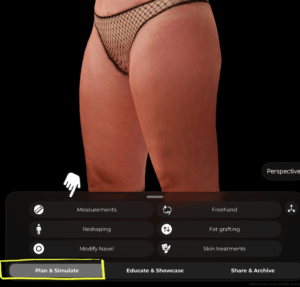
- At the bottom of the screen, make sure you’re in the Plan & Simulate tab.
- Tap Measurements from the tool menu.
 #
#
Types of Measurements #
Circumference #
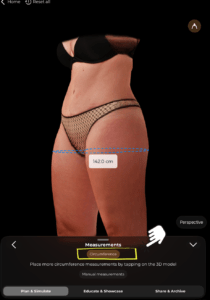
Tap the Circumference option at the top of the Measurements panel. Then tap directly on the 3D model at the level where you want to measure. The app will instantly display the circumference at that point as a dashed blue line with the value shown in centimeters.
You can add multiple circumference measurements by tapping at different levels on the model.
#
Manual Measurements #
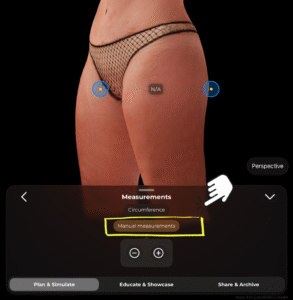
Tap Manual measurements to switch to point-to-point measuring. Two blue anchor points will appear on the model (shown with yellow center dots). You can drag these points to any two locations on the body. The distance between them will be calculated and displayed.
You can also use the − and + buttons at the bottom of the panel to remove or add measurement points.
#
Tips #
- Rotate the 3D model to place measurements from the most accurate angle.
- Use circumference measurements for areas like the waist, hips, and thighs to track body contouring goals.
- Manual measurements are useful for capturing specific distances, such as between anatomical landmarks.
- All measurements update in real time as you adjust point positions.
Conclusion #
Arbrea Body allows you and the patients to visualize realistic body outcomes before the consultation, so patients are prepared to move forward.




 English
  Portuguese
  Italian
  Spanish
  German
  Arabic
  French
  Korean
  Albanian
  Thai
Thai  Hindi
Hindi  Vietnamese
  Japanese