
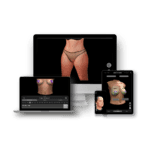
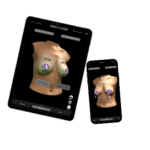
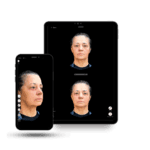
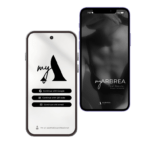
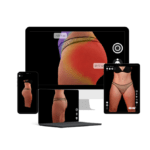
To upgrade your Arbrea Suite plan and unlock all available features, you will need to contact Arbrea’s sales or customer support team. They will guide you through the available packages and help you activate additional modules such as myArbrea and any advanced tools. For further instructions, you can also check the settings or subscription section inside your Arbrea Suite app.
Arbrea Suite Training Hub
A complete resource to help you navigate, customize, and optimize your Arbrea experience
Popular Search
breastFace
Frequently Asked Questions
Arbrea Suite
How can I upgrade my plan to include all available features?
Is Arbrea Suite updated regularly with new features and improvements?
Yes, Arbrea Suite receives regular updates that include new features, system improvements, and optimizations. These updates enhance usability, expand simulation capabilities, and ensure the app stays compatible with the latest devices and iOS versions. To stay informed about the latest releases, you can always check the “What’s New” section directly within your Arbrea Suite application.
How does Arbrea Suite ensure patient data privacy?
Arbrea Suite runs entirely offline, processing all patient data locally on your device to maximize privacy and security. However, if you prefer, you can integrate Arbrea Suite with your own private cloud system to store and manage patient data securely. Click here to learn how to activate private cloud options.
Does Arbrea Suite require an internet connection to function?
Arbrea Suite only needs an internet connection for the initial access and setup. After that, it runs fully offline, as all processing happens locally on the device, ensuring fast performance and data privacy .
What devices are compatible with Arbrea Suite?
Arbrea Suite is compatible with iPhone 11 or newer, iPad Pro 11″ / 12.9″ (4th gen, 2020+) or newer, iPad Air (4th gen, 2020+), iPad mini (6th gen, 2021+), and iPad (10th gen, 2022+). Note that iPads without Face ID may have lower quality in face live/image mode. For optimal performance, Arbrea recommends the latest iPad Pro 11″ with at least 128GB storage. myArbrea/Bellea also requires iPhone 11 or newer.
Full details available here: Arbrea Compatible Devices.
Arbrea Breast
How long does it take to create a simulation with Arbrea Breast?
Creating a simulation with Arbrea Breast takes just a few seconds. Thanks to its AI-powered engine and intuitive workflow, surgeons can quickly generate accurate breast surgery simulations in real-time during consultations, helping streamline the patient experience and decision-making process.
How long does it take to create a simulation with Arbrea Breast?
Creating a simulation with Arbrea Breast takes just a few minutes. Thanks to its AI-powered engine and intuitive workflow, surgeons can quickly generate accurate breast surgery simulations in real-time during consultations, helping streamline the patient experience and decision-making process.
Can Arbrea Breast export simulations for patient review?
Yes, Arbrea Breast allows you to export the simulation in various formats: you can export images, a short video, or even share a dynamic 3D model directly with the patient via myArbrea. This flexibility helps patients better visualize and review the proposed surgical outcomes at their convenience.
Is Arbrea Breast suitable for both primary and revision breast surgeries?
Yes, Arbrea Breast is designed to be effective for both primary and revision breast surgeries. It allows surgeons to simulate procedures such as augmentations, lifts, reductions, and asymmetry corrections, helping to visualize outcomes for first-time surgeries as well as corrective or secondary interventions.
What types of breast procedures can be simulated with Arbrea Breast?
Arbrea Breast is designed to simulate breast augmentation , lifting, reduction , and asymmetry corrections, gynecomastia and reconstruction.
Can Arbrea Breast simulate different implant brands, types and sizes?
Yes, Arbrea Breast allows surgeons to simulate a variety of implant options to assist in decision-making. Click here to find out how to use our implant catalogue.
Arbrea Face
Is Arbrea Face useful for pre- and post-procedure documentation?
Yes, Arbrea Face is very useful for pre- and post-procedure documentation. All simulations and analyses are automatically saved in the patient’s digital file, allowing you to easily compare initial simulations with post-treatment results. This helps track progress and enhances patient communication by showing visual proof of outcomes over time.
Is Arbrea Face compatible with both iPads and iPhones?
Yes, Arbrea Face is fully compatible with both iPads and iPhones. However, for the best performance—especially when using AR features and AI-powered facial analysis—it’s recommended to use newer models, such as iPad Pro, iPad Air (Face ID devices preferred), and iPhone 11 or newer.
Does Arbrea Face use AI technology for facial analysis?
Yes, Arbrea Face uses advanced AI technology to perform automatic facial analysis. The AI identifies key facial landmarks, detects asymmetries, and helps visualize potential improvements for both surgical and non-surgical procedures. This technology supports faster, more accurate simulations and enhances patient consultations.
Can Arbrea Face visualize facial symmetry improvements?
Yes, Arbrea Face allows you to visualize facial symmetry improvements by using its automatic measurement and proportion tools. The system can take key facial measurements to highlight asymmetries and display balanced proportions during consultations. This helps patients better understand potential treatment outcomes.
For a detailed guide on how to use these measurement tools, you can check this resource: How to use the automatic measurements tools.
Can Arbrea Face simulate both surgical and non-surgical facial procedures?
Yes, Arbrea Face is designed to simulate both surgical and non-surgical facial procedures. It can be used for treatments such as rhinoplasty , chin augmentation, facial contouring, and filler injections, providing real-time visualizations to support patient consultations and decision-making.
Arbrea Body
What devices are compatible with Arbrea Body?
To ensure the high-performance requirements of our new body pipeline, which utilizes advanced all-around texture fitting and merging, the Arbrea Body now requires devices with at least 6GB of RAM. Arbrea Body is compatible with iPhone 14 (2022) or newer, iPhone 12 Pro / Pro Max (2020) or newer, iPad Pro (2020) or newer, iPad Air 5th Gen (2022) or newer, iPad mini A17 Pro (2024), and iPad 11th Gen (2025).
Full details available here: Compatible Devices
How does Arbrea’s “Private AI” protect patient data?
Unlike traditional simulators that upload photos to a third-party cloud for processing, Arbrea uses Private AI which runs locally on your device. This means all sensitive images and measurements stay on your iPad, iPhone, Mac ensuring maximum data privacy and compliance without the risk of cloud-based data leaks.
Does Arbrea Body provide automatic body measurements?
Yes. The AI-powered engine automatically calculates essential body parameters and measurements. This helps in analyzing symmetry and proportions, ensuring the simulated outcome is balanced and realistic for the patient’s specific frame.
Can Arbrea Body simulate different volume changes and fat grafting?
Yes. The software features a specialized sculpting and fat grafting tool. This allows surgeons to “add” or “remove” volume in specific anatomical regions to mimic the effects of fat transfer or liposuction with high precision.
What types of body procedures can be simulated with Arbrea Body?
Arbrea Body supports a variety of contouring and reshaping procedures, including:
- Liposuction (targeting specific areas like the abdomen, flanks, or thighs).
- Abdominoplasty (Tummy Tuck).
- Body Contouring and skin tightening treatments.
And so on.
Is Arbrea Body suitable for both surgical and non-invasive procedures?
Absolutely. It is designed for a wide range of treatments, from surgical liposuction and tummy tucks to non-invasive body contouring and fat freezing. It helps bridge the gap between a patient’s expectations and the clinical reality.
Can Arbrea Body export simulations for patient review?
Yes. Simulations can be shared with patients via myArbrea (the dedicated patient app) or sent directly through secure email. This allows patients to review their potential results in private, which helps in the decision-making process.
How long does it take to create a simulation with Arbrea Body?
Arbrea Body is built for speed. Using an iPad, iPhone, Mac, a high-fidelity 3D body simulation can be generated in seconds after taking the initial photos, allowing for a fluid and interactive consultation.
myArbrea
Is myArbrea free for patients to download and use?
Yes, myArbrea is free for patients to download and use. Patients can access it via the App Store or Google Play without any cost, making it easy for them to explore simulations and connect with clinics directly through the app.
Is myArbrea available for both iOS and Android devices?
Yes, myArbrea is available for both iOS and Android devices. This allows patients to access the app on a wide range of smartphones, improving accessibility and convenience for users regardless of their preferred platform.
Can myArbrea be customized for my clinic?
Yes, myArbrea can be personalized for your clinic. You can customize it with your clinic’s branding, logo, and contact details, creating a tailored experience for your patients. This helps reinforce your brand identity while improving trust and engagement with prospective patients who interact with the app.
For more details, visit: What Kind of Links You Can Include on myArbrea
Is myArbrea connected to Arbrea Suite for sharing simulations?
Yes, myArbrea and Arbrea Suite work seamlessly together. Not only can surgeons share 3D simulations from Arbrea Suite directly to myArbrea for patient review, but it also works in reverse—doctors can import a 3D model created by patients within myArbrea back into Arbrea Suite. This two-way integration enhances workflow efficiency and deepens patient-clinic interaction.
How does myArbrea help clinics improve patient engagement and lead generation?
myArbrea enhances patient engagement by allowing users to simulate treatments on their own, building curiosity and trust before meeting a surgeon. Clinics can capture these interested users as qualified leads, boosting appointment requests. By offering interactive experiences and direct communication through the app, myArbrea increases conversion rates and supports clinics in building a stronger digital presence.
What is myArbrea and who is it designed for?
myArbrea is a patient-centric app created to help users visualize aesthetic procedures before booking a consultation. It empowers clinics by acting as a lead-generation tool, capturing potential patients who engage with the app and converting them into actual consultations. By offering interactive previews, myArbrea increases patient interest and drives new leads directly to your practice, helping grow your client base effectively.
You can explore more about myArbrea features here




 English
 Portuguese
 Italian
 Spanish
 German
 Arabic
 French
 Korean
 Albanian
 Thai
 Hindi
 Vietnamese
 Japanese