
Arbrea Breast provides an extensive Implant Catalog featuring a wide range of brands, allowing plastic surgeons to tailor implant selection to each patient’s needs. By setting up implant brands for augmentation and reduction modes, surgeons can streamline their workflow and enhance pre-operative consultations.
Adding Implant Brands in Augmentation Mode #
- Open Arbrea Breast and navigate to Augmentation Mode.
- Click on the Implants Catalog to access the list of available brands.
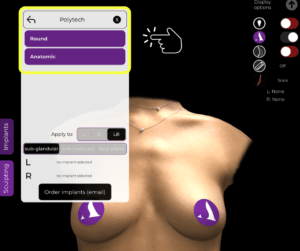
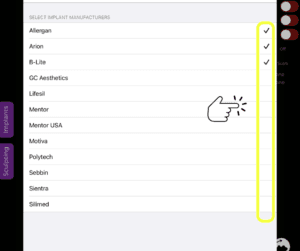
3. Access Settings and go to Implant Catalog settings.

4. Then select the brands you want to have in your Implant Catalog.
Adding Implant Brands in Reduction Mode #
- Choose Reduction Mode within Arbrea Breast.

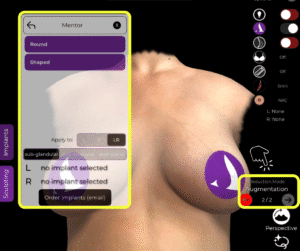
- Then go immediately to Augmentation Mode and open the Implants Catalog to see what brands are available to you for breast reduction cases.
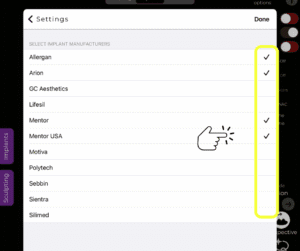
- Access Settings and go to Implant Catalog settings.
- Then select the brands you want to have in your Implant Catalog.

Why This Matters?
- Ensures consistency in implant selection for different procedures.
- Helps surgeons visualize and compare different options based on patient needs.
Conclusion #
The implant brand setup feature in Arbrea Breast simplifies augmentation and reduction planning by providing a customizable implant catalog. By utilizing brand selection, surgeons can enhance consultations and achieve precise pre-operative planning.
For more guidance, watch the full video tutorial below.




 EN
EN  PT
PT  IT
IT  ES
ES  DE
DE