
Arbrea Breast offers powerful 3D and Augmented Reality (AR) simulation modes, allowing plastic surgeons to provide interactive, real-time visualizations for breast augmentation consultations. By switching between 3D mode and AR mode, surgeons can enhance patient engagement and improve Chuẩn bị trước khi phẫu thuật.
How to Simulate in 3D Mode #
- Open Arbrea Breast và chọn trường hợp của bệnh nhân.
- Nhấp vào 3D Mode option to activate the fully interactive 3D simulation.
- Rotate, zoom, and adjust the perspective to analyze the breast augmentation simulation from all angles.
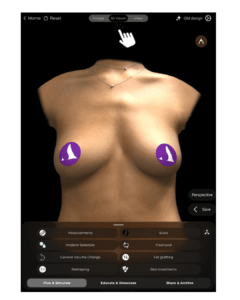
Why Use 3D Mode?
- Cung cấp một detailed and realistic visualization of breast volume and projection.
- Cho phép Những sửa đổi chính xác based on surgical planning.
How to Simulate in Augmented Reality (AR) Mode #
- Chuyển sang AR Mode by selecting the AR Simulation option.
- The system will overlay the simulated breast augmentation directly onto the patient’s live image.
- Move the device around to see real-time changes from different angles.
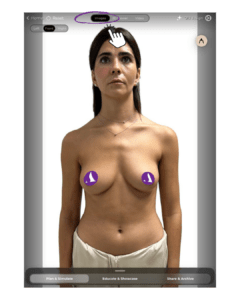
Benefits of AR Mode:
- Enhances patient engagement by providing a realistic, interactive preview.
- Allows patients to see potential results in real time on their own body.
- Cải thiện decision-making and confidence in the chosen procedure.
Changing the View During Simulation #
- Điều chỉnh viewing angle by tapping and dragging on the screen.
- Sử dụng zoom and rotation gestures to refine visualization.
- Switch between 3D Mode and AR Mode seamlessly to provide different perspectives.
Tại sao điều này lại quan trọng?
- Giúp đỡ bệnh nhân better understand the expected results.
- Cung cấp multiple viewpoints to aid in Kế hoạch phẫu thuật.
Kết luận #
Phần 3D and AR simulation tools trong Arbrea Breast provide an innovative and interactive approach to breast augmentation consultations. By utilizing real-time 3D modeling, augmented reality overlays, and dynamic viewpoint adjustments, các bác sĩ phẫu thuật có thể nâng cao patient confidence and consultation efficiency.
Để biết thêm hướng dẫn, hãy xem video Hướng dẫn đầy đủ video dưới đây.





 English
  Portuguese
  Italian
  Spanish
  German
  Arabic
  French
  Korean
  Albanian
  Thai
Thai  Hindi
Hindi  Vietnamese
  Japanese