
Gjiri Arbrea offers powerful 3D and Augmented Reality (AR) simulation modes, allowing plastic surgeons to provide interactive, real-time visualizations for breast augmentation consultations. By switching between 3D mode and AR mode, surgeons can enhance patient engagement and improve planifikimi paraoperativ.
How to Simulate in 3D Mode #
- Open Arbrea Breast dhe zgjidhni rastin e pacientit.
- Klikoni mbi 3D Mode option to activate the fully interactive 3D simulation.
- Rotate, zoom, and adjust the perspective to analyze the breast augmentation simulation from all angles.
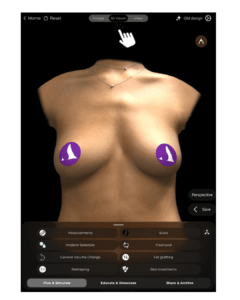
Why Use 3D Mode?
- Siguron një detailed and realistic visualization of breast volume and projection.
- Lejon modifikime të sakta based on surgical planning.
How to Simulate in Augmented Reality (AR) Mode #
- Kalo në AR Mode by selecting the AR Simulation option.
- The system will overlay the simulated breast augmentation directly onto the patient’s live image.
- Move the device around to see real-time changes from different angles.
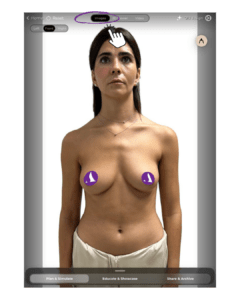
Benefits of AR Mode:
- Enhances patient engagement by providing a realistic, interactive preview.
- Allows patients to see potential results in real time on their own body.
- Përmirëson decision-making and confidence in the chosen procedure.
Changing the View During Simulation #
- Rregullo viewing angle by tapping and dragging on the screen.
- Përdor zoom and rotation gestures to refine visualization.
- Switch between 3D Mode and AR Mode seamlessly to provide different perspectives.
Pse kjo ka rëndësi?
- Ndihmon pacientët better understand the expected results.
- Ofron multiple viewpoints to aid in planifikim kirurgjikal.
Përfundim #
The 3D and AR simulation tools në Gjiri Arbrea provide an innovative and interactive approach to breast augmentation consultations. By utilizing real-time 3D modeling, augmented reality overlays, and dynamic viewpoint adjustments, kirurgët mund të përmirësojnë patient confidence and consultation efficiency.
Për më shumë udhëzime, shikoni tutorial i plotë në video poshtë.





 English
  Portuguese
  Italian
  Spanish
  German
  Arabic
  French
  Korean
  Albanian
  Thai
Thai  Hindi
Hindi  Vietnamese
  Japanese