
หน้าอกอาร์เบรีย offers powerful 3D and Augmented Reality (AR) simulation modes, allowing plastic surgeons to provide interactive, real-time visualizations for breast augmentation consultations. By switching between 3D mode and AR mode, surgeons can enhance patient engagement and improve การวางแผนก่อนผ่าตัด.
How to Simulate in 3D Mode #
- อัปเพอร์ อาร์เบีย บรีสท์ และเลือกเคสของผู้ป่วย.
- คลิกที่ 3D Mode option to activate the fully interactive 3D simulation.
- Rotate, zoom, and adjust the perspective to analyze the breast augmentation simulation from all angles.
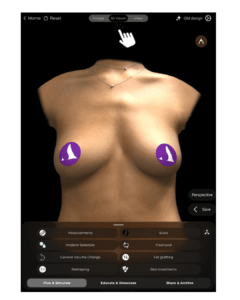
Why Use 3D Mode?
- มีให้ detailed and realistic visualization of breast volume and projection.
- ช่วยให้สามารถ การแก้ไขที่แม่นยำ based on surgical planning.
How to Simulate in Augmented Reality (AR) Mode #
- เปลี่ยนไปที่ AR Mode by selecting the AR Simulation option.
- The system will overlay the simulated breast augmentation directly onto the patient’s live image.
- Move the device around to see real-time changes from different angles.
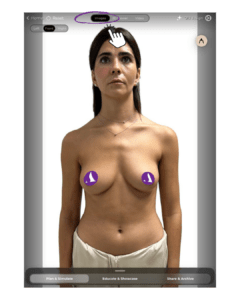
Benefits of AR Mode:
- Enhances patient engagement โดยการให้ realistic, interactive preview.
- Allows patients to see potential results in real time on their own body.
- ปรับปรุง decision-making and confidence in the chosen procedure.
Changing the View During Simulation #
- ปรับความสว่าง viewing angle by tapping and dragging on the screen.
- ใช้ zoom and rotation gestures to refine visualization.
- Switch between 3D Mode and AR Mode seamlessly to provide different perspectives.
ทำไมเรื่องนี้จึงสำคัญ
- ช่วยผู้ป่วย better understand the expected results.
- ให้ข้อมูล multiple viewpoints to aid in surgical planning.
บทสรุป #
เดอะ 3D and AR simulation tools ใน หน้าอกอาร์เบรีย provide an innovative and interactive approach to breast augmentation consultations. By utilizing real-time 3D modeling, augmented reality overlays, and dynamic viewpoint adjustments, ศัลยแพทย์สามารถเพิ่มประสิทธิภาพ patient confidence and consultation efficiency.
สำหรับคำแนะนำเพิ่มเติม รับชมได้ที่ วิดีโอแนะนำแบบเต็ม ด้านล่าง.





 English
  Portuguese
  Italian
  Spanish
  German
  Arabic
  French
  Korean
  Albanian
  Thai
Thai  Hindi
Hindi  Vietnamese
  Japanese