
A mastopexy (breast lift) is a common procedure to restore breast shape and firmness. With หน้าอกอาร์เบรีย, แพทย์ศัลยกรรมพลาสติกสามารถ simulate mastopexy with or without implants, helping patients visualize potential outcomes before surgery.
คู่มือนี้จะนำคุณผ่านกระบวนการแบบขั้นทีละขั้นตอนดังต่อไปนี้ simulating a mastopexy, with or without implants, to enhance your การปรึกษาเพื่อเตรียมการผ่าตัด. คุณจะได้เรียนรู้วิธี modify breast volume, refine results with additional tools, adjust the nipple-areola complex, insert scar indicators, and compare different simulations to support patient decision-making.
Simulating a Mastopexy Without Implants #
- เปิด Arbrea Suite and select the patient’s case in โปรแกรมดูภาพ 3 มิติ.
- Reduce Breast Volume First (If Needed)
- Adjust each breast individually to maintain balance.
Going into the Second Step: Augmentation Mode #
- คลิกที่ เครื่องมือรูปทรง to adjust the breast lift simulation.
- Modify the breast volume by adjusting the sliders to reshape and reposition the breast.
Adjusting Volume to Achieve Desired Results #
- Increase or decrease breast volume to reflect the expected outcome.
- If additional refinements are needed, use:
- Breast Base Up Tool – Adjusts the breast’s foundation.
- Vertical Lift Tool – Simulates how the breast will sit post-surgery.
Using Additional Tools to Analyze the Case #
- If required, use distance and measurement tools to analyze:
- Breast symmetry
- Nipple positioning
- Volume distribution
Inserting Scar Indicators & Adjusting the Nipple-Areola Complex #
- Insert Scar Indicators
- คลิกที่ Scar Indicator Tool to mark potential surgical incisions.
- This helps set realistic patient expectations regarding post-surgical scarring.
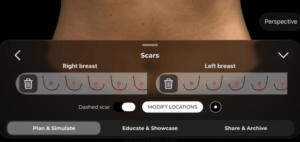
2. Modify the Nipple-Areola Complex (NAC)
-
- เปิด NAC Tool to reduce or reposition the nipple and areola size.
- This reflects common mastopexy adjustments to improve proportion and symmetry.
Resetting the Simulation (If Needed) #
If you need to restart the simulation, simply:
คลิกที่ ปุ่มรีเซ็ต to revert to the original case.
Start a new mastopexy simulation with implants for comparison.
Simulating a Mastopexy With Implants #
- Reduce Breast Volume First (If Needed)
- Adjust each breast individually to maintain balance.
2. Simulate an Augmentation
-
- เปิด แคตตาล็อกรากเทียม and select a suitable implant.
- Filter implants by:
- Brand
- เส้นผ่าศูนย์กลาง
- Projection (Moderate, High, Extra High)
3. Apply the Chosen Implant
-
- เลือก plane of insertion (sub-glandular, sub-muscular, dual-plane).
- Adjust the implant positioning to achieve the best outcome.
Comparing Both Simulations for Patient Decision-Making #
- Bookmark the Mastopexy Without Implants Simulation.
- Create a second simulation with implants and bookmark it.
- Compare both options side by side for the patient to review.
บทสรุป #
เดอะ mastopexy simulation tool ใน หน้าอกอาร์เบรีย ทำให้ง่ายขึ้น breast lift planning ด้วย real-time volume adjustments, areola modifications, and scar visualization. โดยการใช้ simulation refinements, comparative analysis, and interactive tools, ศัลยแพทย์สามารถปรับปรุงการปรึกษาหารือและบรรลุผลลัพธ์ที่แม่นยำ การวางแผนก่อนผ่าตัด.
สำหรับคำแนะนำเพิ่มเติม รับชมได้ที่ วิดีโอแนะนำแบบเต็ม ด้านล่าง.





 English
  Portuguese
  Italian
  Spanish
  German
  Arabic
  French
  Korean
  Albanian
  Thai
Thai  Hindi
Hindi  Vietnamese
  Japanese