
Arbrea Suite bietet eine fortschrittliche Erfassungswerkzeug, wodurch plastische Chirurgen qualitativ hochwertige 3D-Modelle für Ganzkörpersimulationen mit Präzision. Dieses Werkzeug gewährleistet optimale Bildgebungskörper für die präoperative Planung, für Beratungen zur Körperformung.
Zugriff auf die Erfassungsfunktion #
-
Arbrea-Suite öffnen und navigieren Sie zum Arbrea Body Capture Werkzeug.
-
Sicherstellen, dass die die Kamera richtig positioniert ist um klare Ganzkörper-Patientenbilder vom Kopf bis zu den Füßen aufzunehmen.
Warum ist das wichtig? #
-
Bietet eine strukturierter Ansatz zur Aufnahme von qualitativ hochwertigen Bildern des Rumpfes, des Bauches und der Gliedmaßen.
-
Gewährleistet genaue Simulationsergebnisse für Eingriffe wie Fettabsaugung, Bauchstraffungen oder Fetttransplantationen während Beratungsgesprächen.
Aufnahme des perfekten Patientenbildes #
-
Für die richtige Beleuchtung sorgen – Verwenden Sie eine helle, gleichmäßige Beleuchtung, um Schatten zu vermeiden, die die Tiefenwahrnehmung der KI beeinträchtigen können.
-
Bringen Sie den Patienten in eine neutrale Haltung – Der Patient sollte mit schulterbreit auseinander stehenden Füßen und leicht vom Körper abgespreizten Armen (A-Pose) stehen, um die Kontur besser darstellen zu können.
-
Folgen Sie den Anweisungen auf dem Bildschirm nehmen Vorderansicht, Rückansicht und beide Seitenansichten.
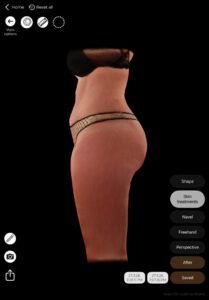
Nutzen:
Hilft bei der Erstellung konsistente, hochwertige 3D-Avatare für KI-gestützte Körpersimulationen, die die einzigartige Anatomie des Patienten erhalten.
Schlussfolgerung #
Arbrea Körper verbessert die Bildqualität, die Simulationsgenauigkeit und die Effizienz der Beratung. Durch die Befolgung strukturierter Körperbildgebungsverfahren und eine korrekte neutrale Positionierung können Chirurgen die Patientenkommunikation verbessern und realistische Erwartungen für Körperumformungsverfahren festlegen.
Arbrea Körper ermöglicht es Ihnen und den Patienten, realistische Ergebnisse am Körper zu visualisieren, bevor sie zur Beratung gehen, damit die Patienten bereit sind, fortzufahren.




 EN
EN  PT
PT  IT
IT  ES
ES  DE
DE