
알브레아 바디 독자적인 방식을 사용합니다 “로컬 AI” 엔진 body simulator designed to deliver fast, realistic 3D simulations in real time.
The Fat Grafting tool in 알브레아 바디 allows surgeons and aesthetic practitioners to simulate this process in real time on the patient’s own 3D body scan, before any procedure takes place. This means patients can visually understand what the outcome may look like, making it a powerful tool for setting realistic expectations and building consultation confidence. Rather than relying on verbal descriptions or generic before/after photos, practitioners can show a personalized, patient-specific simulation in just a few taps.
아르브레아 스위트 열기 #
실행하세요 아르브레 스위트 시뮬레이션을 시작하려면 iPad의 앱을 엽니다.
Getting Started #
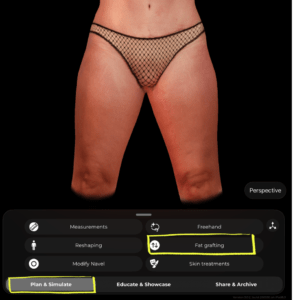
Once you have your patient scan ready, make sure you’re in the Plan & Simulate tab at the bottom of the screen. From the tool menu, tap Fat grafting.
Selecting an Area #
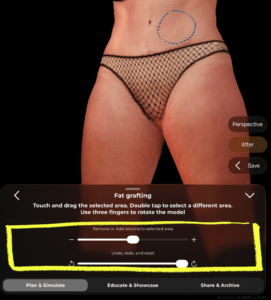
A blue dashed outline will appear on the 3D model indicating the currently selected area. This is the zone where volume will be added or removed.
- Double tap on any area of the model to select a different zone
- Use three fingers to rotate the model and access different angles without losing your selection
 #
#

Adding or Removing Volume #
Once your area is selected, use the slider at the bottom of the panel:
- Drag toward + to add volume (simulate fat grafting / volume enhancement)
- Drag toward − to remove volume (simulate fat reduction in that area)
The changes appear in real time on the 3D model.
#
Undoing Changes #
Below the volume slider, you’ll find the Undo, redo, and reset controls:
- 사용하다 undo arrow to step back one change at a time
- 사용하다 redo arrow to reapply a change
- Drag the reset slider all the way to revert the area back to its original state
Reviewing the Result #
On the right side of the screen you’ll find two helpful buttons:
- After – tap to toggle between the original and simulated result so you can compare before and after
- Save – tap to save the current simulation state before moving on or sharing with the patient
Tips #
- Rotate the model to a flattering angle before selecting an area — this helps you target the right zone more precisely.
- You can apply fat grafting to multiple areas in the same session by double tapping to switch between zones.
- 사용하다 After toggle during the consultation to walk the patient through the expected result in a clear, visual way.
결론 #
알브레아 바디 상담 전에 귀하와 환자가 현실적인 신체 결과를 시각적으로 확인할 수 있게 해 주어 환자가 다음 단계로 나아갈 준비를 할 수 있도록 합니다.




 English
  Portuguese
  Italian
  Spanish
  German
  Arabic
  French
  Korean
  Albanian
  Thai
Thai  Hindi
Hindi