
A bichectomy (buccal fat removal) is a popular aesthetic procedure that refines facial contours by reducing volume in the cheek area. With 아브레아 페이스, 성형외과 의사들은 만들 수 있다 precise and realistic simulations to help patients visualize potential outcomes before undergoing surgery.
In this tutorial, we’ll guide you step by step on how to use the Local Changes tool and the Vector Tool to simulate a bichectomy accurately.
Understanding the Tools for a Bichectomy Simulation #
To simulate a bichectomy in 아브레아 페이스, we use two main tools:
1. Local Changes Tool #
- Allows you to add or remove volume in specific areas of the face.
- Provides precise control over how much fat is removed, ensuring a natural and realistic result.

2. Vector Tool #
- Highlights the modifications made.
- Helps showcase the before-and-after difference clearly to the patient.
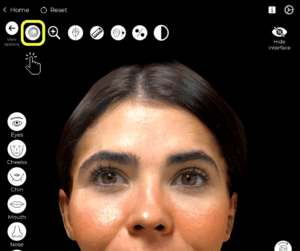
Using the Cheek Tool to Simulate Buccal Fat Removal #
- Open Arbrea Face and select the patient’s image or 3D scan.
- ~을(를) 클릭하세요 Local Changes Tool.
- 조정하다 injection area size:
- Avoid using the maximum setting—keep it medium for better control.
- You can increase or decrease the size based on the precision needed.
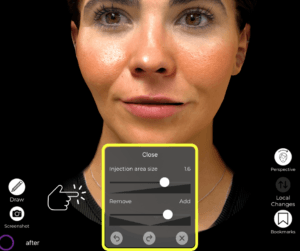
Removing Volume with Local Changes #
- Select the “Remove Volume” option (instead of adding volume).
- Adjust the intensity close to the minimum for a subtle effect.
- Use your finger to carefully apply the tool over the cheek area where fat reduction is desired.
- Rotate the model to ensure even adjustments on both sides.
- If one side has too much reduction, use the undo function to refine the simulation.
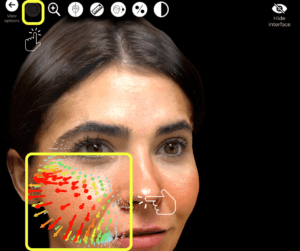
Checking the Modifications with the Vector Tool #
- Open the 벡터 도구 to highlight the changes.
- The tool color-codes the depth of volume removal, making it easier to evaluate the modifications.
- If adjustments are needed, go back and fine-tune the volume removal for a balanced result.
Viewing the Before-and-After Simulation #
Close the tool and toggle the before-and-after view to show the transformation.
Compare the results side by side for a clearer patient discussion.
Highlight the improvements in facial contouring and definition.
결론 #
그 bichectomy simulation tool ~에서 아브레아 페이스 simplifies facial contouring planning ~와 함께 precise fat removal adjustments, real-time modifications, and enhanced visualization options. 활용하여 the Vector Tool, simulation refinements, and before-and-after comparisons, surgeons can enhance consultations and achieve accurate 수술 전 계획.
자세한 안내를 보려면 다음을 시청하세요 전체 동영상 튜토리얼 아래.





 English
  Portuguese
  Italian
  Spanish
  German
  Arabic
  French
  Korean
  Albanian
  Thai
Thai  Hindi
Hindi