
Arbrea Labs is proud to announce its strategic partnership with Mentor, a Johnson & Johnson brand and a global leader in breast aesthetics. This collaboration brings together Arbrea AI, AR & 3D technology with the expertise and reach of Mentor breast implants, resulting in a revolutionary new tool: the Mentor Breast Implant Simulator. Together, we’re making the breast augmentation journey more accessible, transparent, and empowering for doctors and patients.
Arbrea x Mentor Breast Implant Simulator
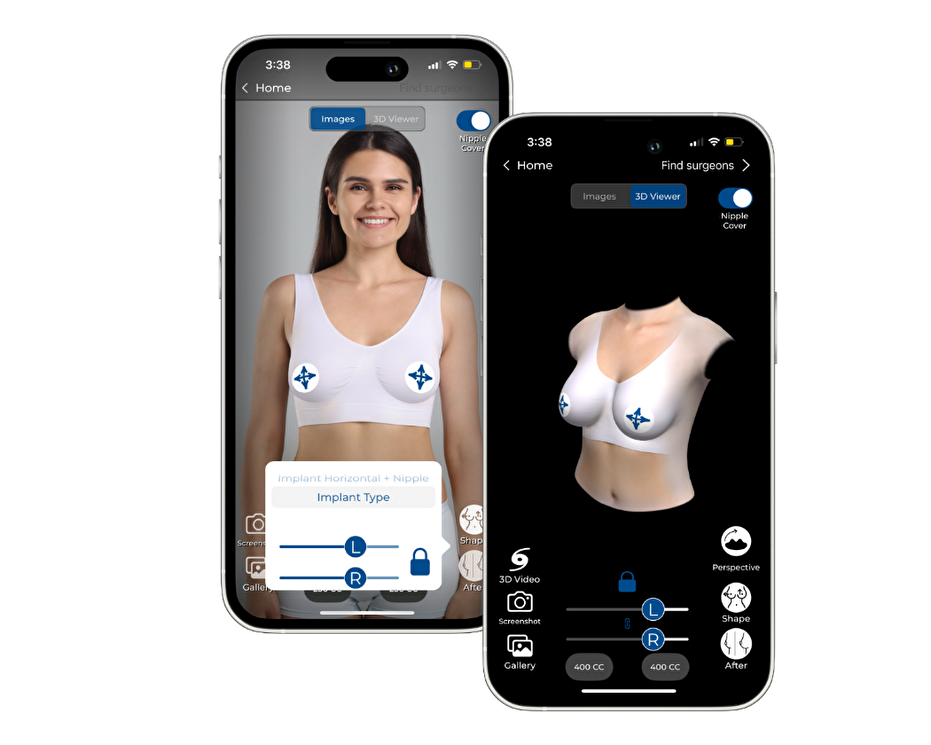
AI, AR & 3D Simulations
Patients can simulate their potential breast augmentation results on their own body using live Augmented Reality, or explore detailed 3D models for a more accurate preview, all from the comfort of their home.
Find Mentor-Certified Surgeons Nearby
With an interactive map, patients can locate trusted Mentor professionals, learn more about their practice, and contact them directly to start their consultation journey.
Trusted Resources for Every Step
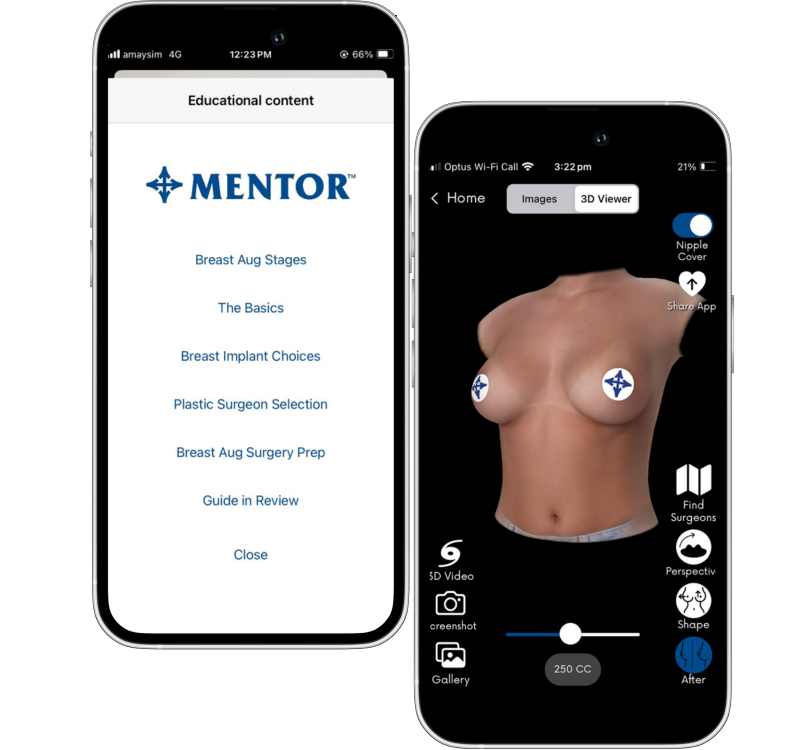
Access expert-reviewed, reliable content about the breast augmentation process, implant options, and recovery, curated by Mentor’s medical and aesthetic specialists to support informed decision-making.
Capture & Share Safely
Patients can take private screenshots or videos of their simulations and securely share them with their chosen surgeon, creating a clear, visual starting point for personalized consultations.
What Is the Mentor Breast Implant Simulator?
Mentor Breast Implant Simulator – Developed in partnership by Arbrea Labs and Mentor (Johnson & Johnson)
The Mentor Breast Implant Simulator is a mobile app that puts you in control of your breast augmentation journey. Designed to be intuitive, private, and empowering, it gives you the tools to explore, learn, and prepare all from your smartphone.
See your potential results: Visualize how you might look using live Augmented Reality on your own body, or explore detailed 3D model simulations, fast, simple, and completely private using just three photos from your phone.
Find the right surgeon: Browse an integrated map to locate Mentor-certified plastic surgeons near you, and reach out directly to start your consultation. Share your simulation directly with them.
Learn with confidence: Access expert-reviewed educational content covering the procedure, your implant options, and what to expect during recovery, so you can walk into your consultation fully informed.
The simulation is fast, simple, and completely private, requiring only three photos taken from the patient’s smartphone.

Recognized Innovation in Medical Aesthetic Technology
We are honored to share that the Breast Implant Simulator was ranked #3 in NewBeauty’s Top 9 Plastic Surgery Trends at The Aesthetic Meeting 2024.
“It allows you to share simulated results with your friends for feedback, engaging patients earlier and providing a personalized experience for those considering breast augmentation.”
This recognition underscores our shared commitment with Mentor to empower patients through transparency, technology, and trust.
Getting Started with Mentor Implant Simulator
A New Standard in Patient Engagement
The Mentor Breast Implant Simulator is more than just a visualization tool, it’s a lead generation and conversion accelerator for aesthetic surgeons:
Offer the simulation service for free to attract new patients and enrich first consultations.
Boost visibility with geo-localization and direct contact options inside the app.
Start meaningful conversations by receiving the patient’s simulation in advance.
As demonstrated by Dr. Bradley Hall, integrating simulation into practice enhances engagement and supports surgical planning from day one.
Shaping Confidence, Together
With this strategic partnership, Arbrea Labs and Mentor are setting a new benchmark for patient-centered innovation in breast augmentation. Combining world-class implant design with immersive simulation technology, we are helping patients worldwide make more informed, confident, and empowering decisions.
Frequently asked questions
Is the breast implant simulation accurate?
Mentor Breast Implant Simulator uses advanced 3D modeling, Augmented Reality (AR) and Artificial Intelligence to provide a realistic preview of your potential results. While no simulation can predict outcomes with 100% precision, it’s a powerful visual tool to guide your consultation and set clear expectations.
Is my data and photo information kept private?
Absolutely. Your privacy is our top priority. All images and simulation data are securely stored on your device and never shared without your permission. You’re always in control of what you choose to send to your surgeon.
How many photos do I need to take to start a simulation?
You only need to take three photos: one front-facing and two side views (left and right). The process is simple, safe, and doesn’t require any external device, only the camera of your phone.
Can I use the simulator even if I haven’t chosen a surgeon yet?
Yes! The app includes a surgeon locator that helps you find Mentor-certified doctors near you. Once you’ve created a simulation, you can share it with the surgeon you choose.
Is there a cost to use the Breast Implant Simulator?
No, the app is completely free to download and use. It’s designed to help you explore your options, gain confidence, and prepare for a more informed conversation with your doctor.



 EN
EN PT
PT IT
IT ES
ES DE
DE