
Simulating a Tummy Tuck with อาร์เบรีย สวีท requires a combination of volume management and skin repositioning. อาร์เบรีย บอดี้’s AI handles the anatomical tension to ensure the result looks natural and surgical, not just flattened.
Perform Volume Shape #
-
Select the shape option tool.
-
ใช้ Slider to control the intensity of the reduction to keep the result realistic.
- Change the waist, hips volume.

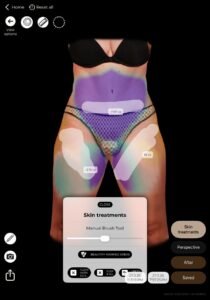
Apply the “Skin Tightening” Effect #
- Activate the Skin Treatments, Navel, Freehand feature.
- Use the tool to pull the abdominal tissue toward the midline.
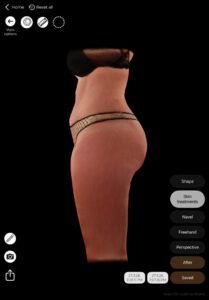
- Watch as the AI automatically adjusts the profile view, showing the transition from a rounded abdomen to a flat, athletic silhouette.
#
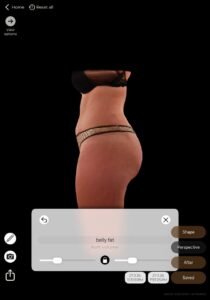
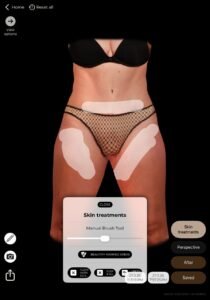
Before and After Comparison #
- ใช้ “After” mode to show the patient the difference between their current state and the simulated Tummy Tuck.
- Focus on the Profile View: This is usually the “wow” moment for patients, as it shows the significant change in abdominal projection.
ประโยชน์
ช่วยสร้าง อวตาร 3 มิติที่มีคุณภาพสูงและสม่ำเสมอ สำหรับการจำลองร่างกายด้วย AI เพื่อให้แน่ใจว่ากายวิภาคที่เป็นเอกลักษณ์ของผู้ป่วยได้รับการรักษาไว้.
บทสรุป #
อาร์เบรีย บอดี้ เพิ่มคุณภาพของภาพ ความแม่นยำในการจำลอง และประสิทธิภาพในการให้คำปรึกษา ด้วยการปฏิบัติตามเทคนิคการถ่ายภาพร่างกายที่มีโครงสร้างและการจัดวางตำแหน่งที่เป็นกลางอย่างเหมาะสม ศัลยแพทย์สามารถปรับปรุงการสื่อสารกับผู้ป่วยและกำหนดความคาดหวังที่สมจริงสำหรับขั้นตอนการปรับรูปร่างได้.
อาร์เบรีย บอดี้ ช่วยให้คุณและผู้ป่วยสามารถเห็นภาพผลลัพธ์ของร่างกายที่สมจริงก่อนการปรึกษา เพื่อให้ผู้ป่วยมีความพร้อมที่จะก้าวไปข้างหน้า.




 English
  Portuguese
  Italian
  Spanish
  German
  Arabic
  French
  Korean
  Albanian
  Thai
Thai  Hindi
Hindi