
Sharing breast simulation results with patients is a key part of enhancing communication, trust, and consultation quality. 알브레아 브레스트 offers a variety of easy and professional ways to share simulation visuals—including screenshots, 3D videos, 그리고 myArbrea integration—so patients can review their options and feel confident in their decisions.
Accessing the Implant Catalog #
-
Start by opening the Implant Catalog to select and apply the desired implant.
-
Choose the most suitable implant by filtering by brand, size, projection, or shape.
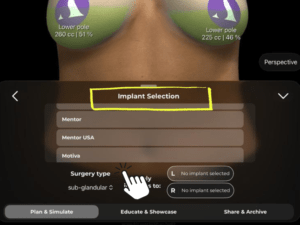
Why It Matters:
Lays the foundation for a realistic and tailored simulation.
Refining the Simulation with the Shape Tool #
-
사용하다 도형 도구 to make final adjustments, such as:
-
Lift
-
Cleavage distance
-
Projection and positioning
-
-
Customize the simulation to match your technique and patient expectations.

도움이 됩니다 fine-tune the result before sharing it with the patient.
Taking Screenshots of the Results #
-
Click the Screenshot button to capture high-quality images of the simulation.
-
You can take:
-
Standard frontal views
-
Different perspectives (profile, angled, etc.)
-
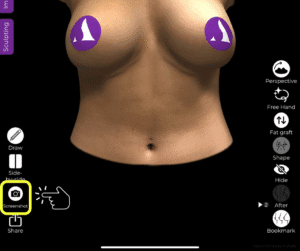
Why It’s Useful:
Screenshots serve as visual references for patient education and follow-up.
Using the Measurement Tool and Volume Analytics #
-
활성화 Measurement Tool to display patient-specific breast metrics.
-
Click again to view volume analytics, showing how the implant has altered volume distribution.
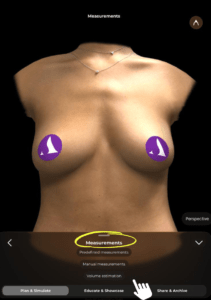
다음 내용을 추가합니다. clinical, data-driven layer to the visuals you’re sharing.
Sharing Screenshots with the Patient #
After taking screenshots:
-
-
Export them via AirDrop, email, or secure messaging.
-
Use them during consultations or attach to post-consultation follow-up materials.
-
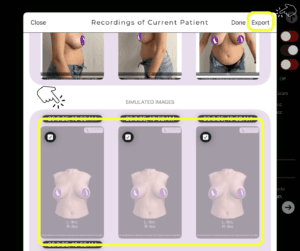
Reinforces the value of the consultation and improves patient recall.
Sharing a 3D Video of the Simulation #
-
Generate a 3D simulation video directly from the app.
-
This video provides a rotating view of the simulation, giving the patient a comprehensive look.
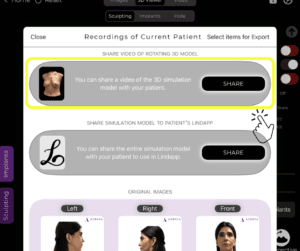
Offers a more immersive and engaging experience than static images.
Sharing the Simulation via myArbrea (Optional) #
-
If you’re a myArbrea user, you can send the simulation to the patient via Arbrea Suite.
-
Patients can view their 3D simulation and other consultation content anytime, anywhere.
Ideal for remote consultations, pre-visit prep, or follow-up communication.
결론 #
알브레아 브레스트 makes it easy and professional to share breast simulation results with your patients through screenshots, videos, and myArbrea links. These tools not only improve patient understanding and satisfaction but also reinforce your clinic’s high-tech, patient-focused approach.
자세한 안내를 보려면 다음을 시청하세요 전체 동영상 튜토리얼 아래.





 English
  Portuguese
  Italian
  Spanish
  German
  Arabic
  French
  Korean
  Albanian
  Thai
Thai  Hindi
Hindi