
알브레아 브레스트 provides an extensive Implant Catalog featuring a wide range of brands, allowing plastic surgeons to tailor implant selection to each patient’s needs. By setting up implant brands for augmentation and reduction modes, surgeons can streamline their workflow and enhance pre-operative consultations.
Adding Implant Brands in Augmentation Mode #
- 오픈 아브레아 브레스트 and navigate to Augmentation Mode.
- ~을(를) 클릭하세요 임플란트 카탈로그 to access the list of available brands.
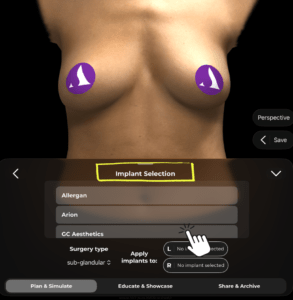
3. Access 설정 and go to Implant Catalog settings.
4. Then select the brands you want to have in your Implant Catalog.
Adding Implant Brands in Reduction Mode #
- Choose Reduction Mode within Arbrea Breast.

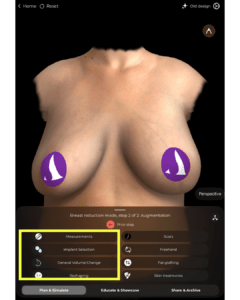
- Then go immediately to Augmentation Mode and open the 임플란트 카탈로그 to see what brands are available to you for breast reduction cases.
- Access 설정 and go to Implant Catalog settings.
- Then select the brands you want to have in your Implant Catalog.

이것이 중요한 이유
- 보장합니다 consistency in implant selection for different procedures.
- Helps surgeons visualize and compare different options based on patient needs.
결론 #
그 implant brand setup feature ~에서 알브레아 브레스트 simplifies augmentation and reduction planning 제공함으로써 customizable implant catalog. 활용하여 brand selection, surgeons can enhance consultations and achieve 정밀한 수술 전 계획.
자세한 안내를 보려면 다음을 시청하세요 전체 동영상 튜토리얼 아래.





 English
  Portuguese
  Italian
  Spanish
  German
  Arabic
  French
  Korean
  Albanian
  Thai
Thai  Hindi
Hindi