
아르브레 스위트 allows plastic surgeons to customize the platform’s branding, ensuring a personalized and professional look for patient consultations. With options to change theme colors, upload a clinic logo, and adjust interface settings, this feature helps surgeons align Arbrea Suite with their brand identity.
Starting the Customization Process #
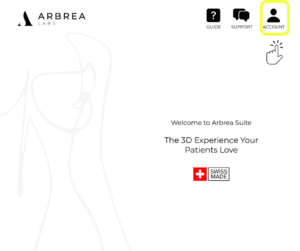
- 열다 아르브레 스위트 그리고 이동하세요 Customization Settings.
- 선택하세요 Brand Customization section to access personalization options.
왜 중요한가요?
- Creates a professional and cohesive brand presence during patient consultations.
- Enhances patient trust by showcasing a branded experience.
Accessing the Theme Colors #
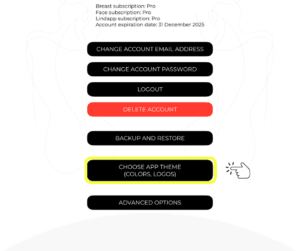
- ~을(를) 클릭하세요 Theme Color section in the customization menu.
- Choose from preset color palettes or select custom colors that match your clinic’s branding.
Benefit:
- Reinforces brand consistency across all patient interactions.
Uploading Your Clinic Logo #
- 이동하기 Upload Logo option.
- Select a high-resolution image of your clinic’s logo.
- Adjust the positioning if needed to ensure proper display.

이것이 중요한 이유
- 도움이 됩니다 build brand recognition 상담 중에.
- 다음 내용을 추가합니다. professional touch to patient interactions.
Changing the Colors of Arbrea Suite #
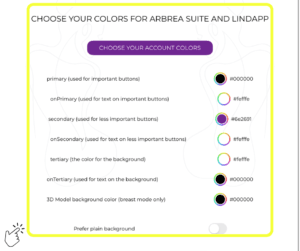
- Customize primary and secondary colors to match your brand’s style.
- Adjust UI elements such as buttons, backgrounds, and menus.
이점:
- Creates a unique and professional interface that aligns with your practice.
Saving Your Changes #
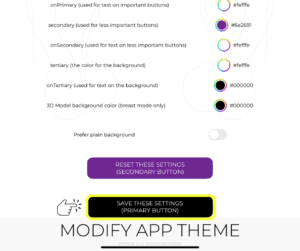
- After making all adjustments, click Save to apply the changes.
- Restart 아르브레 스위트 to see the customized branding in action.
Benefit:
- 보장합니다 all changes are stored and visible during every consultation.
결론 #
This how-to Customize Arbrea Suite to Your Brand enhances clinic branding and patient experience with custom logos, theme colors, and personalized UI settings. By utilizing color adjustments, logo uploads, and branding refinements, surgeons can create a seamless and professional consultation experience.
자세한 안내를 보려면 다음을 시청하세요 전체 동영상 튜토리얼 아래.





 English
  Portuguese
  Italian
  Spanish
  German
  Arabic
  French
  Korean
  Albanian
  Thai
Thai  Hindi
Hindi