
Arbrea Suite offre un avanzato Strumento di cattura, consentendo ai chirurghi plastici di creare di alta qualità Modelli 3D per simulazioni di corpo intero con precisione. Questo strumento assicura immaginografia corporea ottimale per la pianificazione pre-operatoria, consulenze di body contouring.
Accesso alla funzione di cattura #
-
Suite Arbrea aperta e navigare fino alla cartella Arbrea Strumento di Cattura del Corpo.
-
Assicurarsi che il la telecamera è posizionata correttamente per catturare immagini chiare del paziente a corpo intero, dalla testa ai piedi.
Perché è importante? #
-
Fornisce un approccio strutturato per catturare immagini di alta qualità del tronco, dell'addome e degli arti.
-
Assicura risultati di simulazione accurati per procedure come la liposuzione, l'addominoplastica o il lipofilling durante le consultazioni.
Scattare l'immagine perfetta del paziente #
-
Garantire un'illuminazione adeguata – Usa un'illuminazione luminosa e uniforme per evitare ombre che potrebbero interferire con la percezione della profondità dell'IA.
-
Posizionare il paziente in una postura neutra. – Il paziente dovrebbe stare in piedi con i piedi alla larghezza delle spalle e le braccia leggermente discoste dal corpo (posizione a A) per una migliore visualizzazione del contorno.
-
Segui le istruzioni sullo schermo prendere vista frontale, posteriore e di entrambi i profili.
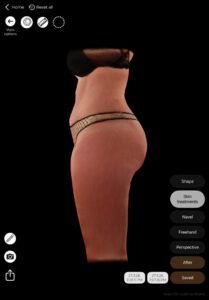
Benefici:
Aiuta a creare avatar 3D coerenti e di alta qualità per simulazioni corporee basate sull'intelligenza artificiale, garantendo il mantenimento dell'anatomia unica del paziente.
Conclusione #
Corpo Arbrea migliora la qualità dell'immagine, l'accuratezza della simulazione e l'efficienza della consulenza. Seguendo tecniche strutturate di imaging corporeo e un corretto posizionamento neutro, i chirurghi possono migliorare la comunicazione con il paziente e stabilire aspettative realistiche per le procedure di rimodellamento corporeo.
Corpo Arbrea consente a te e ai pazienti di visualizzare risultati corporei realistici prima della consulenza, così i pazienti sono preparati ad andare avanti.




 EN
EN  PT
PT  IT
IT  ES
ES  DE
DE