
아브레아 페이스 provides a powerful Annotation Tool ~를 위해 Botox and filler simulations, 이를 통해 플라스틱 성형 외과 의사가 plan, customize, and visualize injectable treatments with precision. This feature enhances patient consultations by offering real-time injection mapping, dosage adjustments, and before-and-after comparisons.
Simulating Botox and Fillers #
- 열다 아브레아 페이스 그리고 환자의 사례를 선택합니다.
- 이동하기 Injectables Simulation Tool to begin mapping the injection plan.
- 선택하세요 Botox or dermal fillers depending on the treatment area.
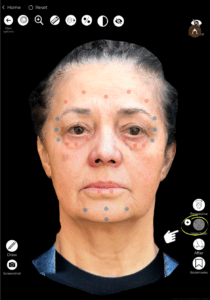
왜 중요한가요?
- 허용합니다 precise simulation of injectable procedures.
- 환자들을 돕습니다 visualize treatment outcomes before the procedure.
Using Injection Points #
- Select the area where the injection will be applied.
- The tool will automatically place an injection dot on the targeted region.
- Multiple injection points can be added to create a comprehensive treatment plan.
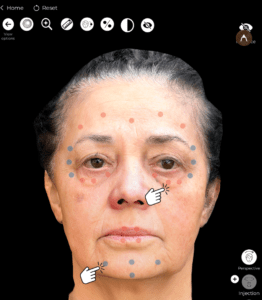
이점:
- Customizable injection mapping for different treatment areas.
- Helps surgeons plan dosage distribution efficiently.
Customizing the Injection Color Points #
- Each injection type (Botox or Filler) has a color-coded point system.
- Customize the color of injection dots to differentiate treatment types.
- You can find it at Settings.
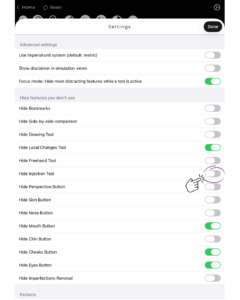
이것이 중요한 이유
- 제공합니다 better organization and clarity when treating multiple areas.
- 허용합니다 easy identification of injection sites during the consultation.
Moving Injection Points for Precision #
- If an injection point is incorrectly placed, simply drag and reposition it.
- Ensure that dots align with muscle structure or volume enhancement areas.
혜택:
- 활성화합니다 precise placement adjustments for more accurate simulations.
Opening the Planning Tool for Injections #
- ~을(를) 클릭하세요 Planning Tool to access detailed treatment options.
- Add notes, dosage information, and injection techniques.
- Save the treatment plan for future reference.
이점:
- 외과의사가 ~할 수 있도록 허용합니다 document and refine treatment strategies.
- Creates a structured visual roadmap for injectables.
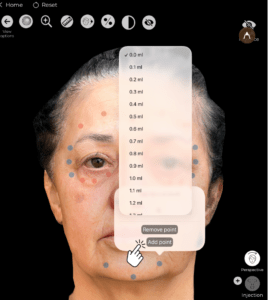
Removing Unnecessary Injection Dots #
- If a placement needs adjustment, simply select and delete the injection dot.
- 이는 확실히 보장합니다. cleaner, more accurate simulation.
왜 유용할까요?
- Quick corrections and refinements can be made in real-time.
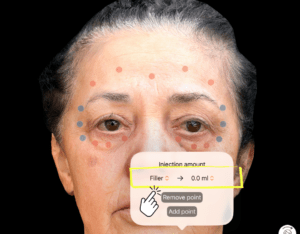
Choosing Between Filler and Botox for Each Injection Dot #
- Each injection point can be assigned as either Botox or filler.
- Adjust the selection to match the treatment area and intended outcome.
혜택:
- 이를 가능하게 합니다. detailed and tailored treatment simulation.
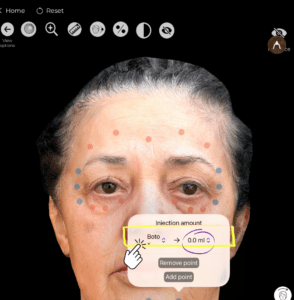
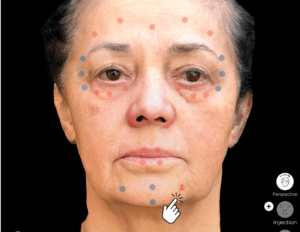
Selecting the Injection Filler Amount in ml #
- ~을(를) 클릭하세요 injection dot and input the desired filler volume in milliliters.
- Adjust dosage based on treatment goals and patient anatomy.
이것이 중요한 이유
- 환자들을 돕습니다 understand the required filler volume 치료 전.
- Assists surgeons in precisely planning injections.
결론 #
그 Annotation Tool for Injectables ~에서 아브레아 페이스 단순화하다 Botox and filler treatment planning ~와 함께 customizable injection points, dosage adjustments, and real-time simulations. 활용하여 color-coded markers, precise placement controls, and interactive treatment planning, surgeons can enhance consultations and achieve accurate pre-procedure planning.
자세한 안내를 보려면 다음을 시청하세요 전체 동영상 튜토리얼 아래.





 English
  Portuguese
  Italian
  Spanish
  German
  Arabic
  French
  Korean
  Albanian
  Thai
Thai  Hindi
Hindi  Vietnamese
  Japanese