
아브레아 페이스 offers a fast and accurate way to simulate lip enhancement procedures, helping plastic surgeons provide patients with realistic previews of potential outcomes. Using the 자유 손 도구 그리고 Lip settings, you can define lip volume, shape, and symmetry with high precision—all while keeping the consultation interactive and educational.
Using the Freehand Tool for Lip Sculpting #
-
다음 파일을 엽니다. 자유 손 도구 to begin sculpting the lips.
-
이 도구를 사용하면 add or reduce volume manually, ideal for simulating:
-
Lip fillers
-
Contour reshaping
-
Corrective enhancements
-

이것이 중요한 이유:
활성화합니다 precise control for tailoring lip results to the patient’s aesthetic goals.
Accessing the Features that Focus on the Lips #
-
Within the Freehand Tool, you can choose to isolate the Lips area.
-
This ensures your changes are applied only to the targeted region, without affecting surrounding facial structures.
제공합니다 focused editing experience for better accuracy.
Defining the Lips with the Smallest Brush Size #
선택하세요 smallest brush size for detailed sculpting, especially useful for:
-
-
Defining the cupid’s bow
-
Shaping the lip border
-
Correcting asymmetry
-

~에 이상적인 delicate adjustments and high-precision simulations.
Achieving Precision with Area Mode #
-
전환 지역 모드 within the Freehand Tool to draw and select specific lip zones.
-
This mode allows for asymmetric or custom volume distribution.
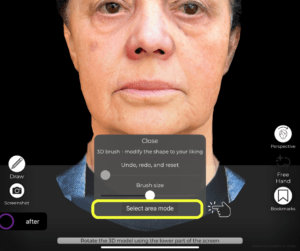
Enhances your ability to tailor results to natural anatomy and patient preferences.
전후 비교 #
-
사용하다 전후 비교 토글 to show the transformation side-by-side.
-
This visual comparison helps patients understand the subtle yet impactful changes from the simulation.

빌드 patient trust and engagement by setting realistic expectations.
결론 #
Simulating lip procedures ~와 함께 아브레아 페이스 is precise, intuitive, and interactive. By leveraging tools like the Freehand Sculpting, Features That Focus On The Lips, 그리고 Before/After visualization, surgeons can guide patients through the process and help them feel confident in their treatment choices.
자세한 안내를 보려면 다음을 시청하세요 전체 동영상 튜토리얼 아래.





 English
  Portuguese
  Italian
  Spanish
  German
  Arabic
  French
  Korean
  Albanian
  Thai
Thai  Hindi
Hindi  Vietnamese
  Japanese