
알브레아 브레스트 강력한 기능을 제공합니다. 북마크 기능 that allows plastic surgeons to save and compare multiple implant options, enhancing patient consultations and pre-operative planning. By utilizing implant selection, catalog filtering, and real-time comparisons, 외과의들은 guide patients through their options more effectively.
Selecting an Implant from the Catalog #
- 열다 알브레아 브레스트 그리고 이동하세요 임플란트 카탈로그.
- Choose from a variety of implant brands and models.
- 선택하세요 implant shape, size, and projection based on the patient’s needs.

혜택: The catalog provides a wide selection of implants, covering major brands and options.
Filtering the Catalog for Precision Selection #
Since implant catalogs include multiple options, filtering helps narrow down selections:
- Filter by Diameter – Ensures a proper fit for the patient’s breast base.
- Filter by Volume – Helps maintain proportional aesthetics.
- Filter by Projection – Choose between Low, Moderate, High, or Extra-High Projection.

이점: The filtering system makes it faster and easier to find the best implant for each patient.
Saving Multiple Implant Simulations Using Bookmarks #
- Once an implant is selected, click the 북마크 버튼 to save it.
- 선택한 항목 second implant and bookmark it as well.
- Repeat this process for multiple implant options.
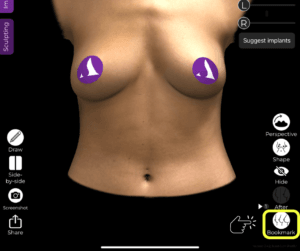
왜 중요한가요?
- 허용합니다 quick comparisons without needing to reapply implants manually.
- 외과 의사들에게 도움을 줍니다. present multiple options efficiently.
Switching Between Different Implant Options for Comparison #
- 다음 파일을 엽니다. Bookmarks section to view saved implant options.
- 간편하게 전환하세요 different implants to visualize changes in real time.
- 비교 size, projection, and overall aesthetic impact side by side.


혜택: Patients can clearly see how different implants will affect their appearance, making it easier to make an informed decision.
결론 #
그 북마크 기능 ~에서 알브레아 브레스트 단순화하다 implant selection and comparison 제공함으로써 an efficient, real-time visualization tool. 활용하여 implant filtering, simulation refinements, and instant comparisons, 외과 의사들은 상담을 강화하고 정확한 결과를 얻을 수 있습니다. 수술 전 계획.
자세한 안내를 보려면 다음을 시청하세요 전체 동영상 튜토리얼 아래.





 English
  Portuguese
  Italian
  Spanish
  German
  Arabic
  French
  Korean
  Albanian
  Thai
Thai  Hindi
Hindi  Vietnamese
  Japanese