
Cuerpo Arbrea usa un propietario “Motor de IA local simulador de cuerpos diseñado para ofrecer simulaciones 3D rápidas y realistas en tiempo real.
Primeros pasos #
Antes de tomar medidas, tiene dos opciones para empezar:
Centro de Entrenamiento – Abra el Centro de Capacitación si desea practicar primero con un paciente de demostración. Esta es una excelente manera de familiarizarse con las herramientas antes de trabajar con casos reales.


Paciente Nuevo – Si estás listo para trabajar con un caso real, toca Paciente Nuevo, seleccionar Nuevo escaneo corporal, y elige Masculino o Femenino. Puedes cargar fotos existentes o tomar nuevas directamente en la aplicación. Una vez que tu escaneo esté listo, puedes comenzar la simulación y las mediciones.
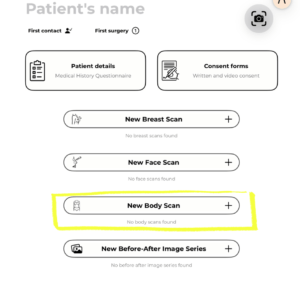
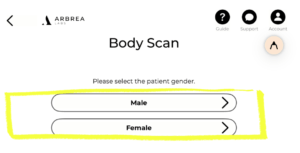

Accediendo a la herramienta de mediciones #
Una vez que esté dentro de un caso de paciente en Arbrea Body:
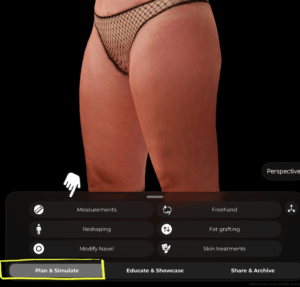
- En la parte inferior de la pantalla, asegúrate de estar en la Planificar y Simular pestaña.
- Toque Medidas del menú de herramientas.
 #
#
Tipos de Mediciones #
Circunferencia #
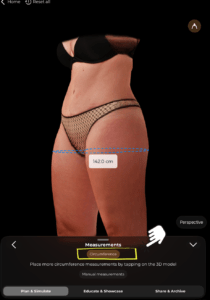
Toca Circunferencia Opción en la parte superior del panel Medidas. Luego toque directamente en el modelo 3D al nivel donde desea medir. La aplicación mostrará instantáneamente la circunferencia en ese punto como una línea azul discontinua con el valor mostrado en centímetros.
Puedes agregar múltiples mediciones de circunferencia tocando en diferentes niveles del modelo.
#
Medidas Manuales #
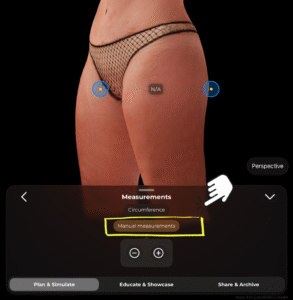
Toque Mediciones manuales para cambiar a medición punto a punto. Aparecerán dos puntos de anclaje azules en el modelo (mostrados con puntos centrales amarillos). Puedes arrastrar estos puntos a cualquier par de ubicaciones en el cuerpo. La distancia entre ellos se calculará y mostrará.
También puede utilizar la función − y + botones en la parte inferior del panel para eliminar o agregar puntos de medición.
#
Consejos #
- Gira el modelo 3D para colocar las mediciones desde el ángulo más preciso.
- Utiliza medidas de circunferencia para áreas como la cintura, las caderas y los muslos para seguir los objetivos de contorno corporal.
- Las mediciones manuales son útiles para capturar distancias específicas, como entre puntos de referencia anatómicos.
- Todas las mediciones se actualizan en tiempo real a medida que ajusta las posiciones de los puntos.
Conclusión #
Arbrea Body permite a usted y a los pacientes visualizar resultados corporales realistas antes de la consulta, para que los pacientes estén preparados para seguir adelante.




 EN
EN  PT
PT  IT
IT  ES
ES  DE
DE