
Kalo te përmbajtja kryesore
Shtypni Enter për të kërkuar ose ESC për të mbyllur
Mbyll kërkimin
Arbrea Labs
Menuja
  • Zgjidhje
    • Zgjidhje
    • Zgjidhje
      • Për Kirurgët Plastikë
      • Për Mjekët Estetikë
      • Për injektorët e fytyrës
  • Rreth
    • Rreth nesh
    • Rreth nesh
      • Rreth Nesh
      • Ndihma e Arbrea
      • Karriera
      • Kontaktoni
      • Partnerë
  • Atë që ndërtojmë
    • Atë që ndërtojmë
    • Atë që ndërtojmë
      • Arbrea Suite
      • Gjiri Arbrea
      • Arbrea Face
      • ARBREA BODY
      • myArbrea
      • Arbrea x Mentor
      • Platforma e Kirurgëve
  • Burimet
    • Burimet
    • Burimet
      • Botimet
      • Blogu Arbrea
      • Këshilla për Marketing dhe Shitje
      • Çfarë ka të re
  • Programi i Partneritetit
  • I besëueshëm
  • SQ
    • EN
    • ES
    • IT
    • DE
    • PT
    • AR
    • FR
    • KO
    • TH
    • HI
  • Fillo Falas
  • Platforma e Kirurgëve
  • Zgjidhje
    • Zgjidhje
    • Zgjidhje
      • Për Kirurgët Plastikë
      • Për Mjekët Estetikë
      • Për injektorët e fytyrës
  • Rreth
    • Rreth nesh
    • Rreth nesh
      • Rreth Nesh
      • Ndihma e Arbrea
      • Karriera
      • Kontaktoni
      • Partnerë
  • Atë që ndërtojmë
    • Atë që ndërtojmë
    • Atë që ndërtojmë
      • Arbrea Suite
      • Gjiri Arbrea
      • Arbrea Face
      • ARBREA BODY
      • myArbrea
      • Arbrea x Mentor
      • Platforma e Kirurgëve
  • Burimet
    • Burimet
    • Burimet
      • Botimet
      • Blogu Arbrea
      • Këshilla për Marketing dhe Shitje
      • Çfarë ka të re
  • Programi i Partneritetit
  • I besëueshëm
  • SQ
    • EN
    • ES
    • IT
    • DE
    • PT
    • AR
    • FR
    • KO
    • TH
    • HI
  • Fillo Falas
  • Platforma e Kirurgëve
  • Facebook
  • LinkedIn
  • YouTube
  • instagram

Arbrea Suite Academy

5
  • How to Share a Case from Arbrea Suite to myArbrea
  • How to Use Arbrea Suite
  • How to Integrate Arbrea into Your Consultation
  • How to Activate Private Cloud Options
  • How to Customize Arbrea Suite to Your Brand 

Arbrea Breast Academy

22
  • How to Use Arbrea Breast – An Overview
  • How to Create a 3D Model for the Breast
  • How to Simulate in AR & 3D Mode
  • How to Use Sculpting Mode
  • How to Use the Implants Catalog
  • How to Set Up the Implant Brands
  • How to Use the Shape Tool
  • How to Use Bookmarks to Compare Different Implants
  • How to Simulate a Mastopexy With or Without Implants
  • How to Use Measurements
  • How to Use the Scars Tool
  • How to Use the Fat Grafting Tool
  • How to Share the Breast Simulation with Patients
  • How to Simulate Breast Reconstruction
  • How to Simulate Tuberous Breast
  • How to Simulate a Gynecomastia
  • How to Simulate an Implant Replacement 
  • How to Capture Complex Cases
  • How to Import a Model from myArbrea
  • How to Mirror to an External Screen
  • How to Order Implants
  • How to Simulate Asymmetries

Arbrea Face Academy

12
  • How to Use Arbrea Face
  • How to Make a 3D Model
  • How to Use the Automatic Measurements Tools
  • How to Use the New Free Hand Tool
  • How to Use the Annotation Tool for Injectables
  • How to Simulate a Rhinoplasty
  • How to Simulate a Facelift
  • How to Simulate Lip Procedures
  • How to Simulate Cheek Procedures
  • How to Share the Face Simulation with Patients
  • How to Simulate Chin Procedures
  • How to Simulate a Bichectomy

myArbrea

13
  • How to Add a myArbrea Code from Arbrea Suite
  • How to Request the Activation of myArbrea
  • How to Check Your myArbrea Analytics
  • How to Check and Contact Your myArbrea Users
  • How to Share a Case from myArbrea to Arbrea Suite
  • How to Use myArbrea
  • Why Should You Use myArbrea
  • What Are the Benefits of myArbrea to Current Users 
  • What Kind of Links You Can Include on myArbrea
  • How to Market myArbrea on Instagram and Other Media
  • How to Use myArbrea to Reduce No-Show Rate
  • How to Use myArbrea in Remote Consultations
  • How to Integrate myArbrea in Your Website

Arbrea Body

7
  • How to Use the Fat Grafting Tool
  • How to Capture the Best Body Images for Simulation
  • How to Share the Body Simulation with Patients
  • How to Use Body Measurements
  • How can I simulate an Abdominoplasty (Tummy Tuck)?
  • How do I create a 3D Body Model?
  • How does Arbrea Body work? (Overview)
View Categories
  • Kryefaqja
  • Docs
  • Arbrea Face Academy
  • How to Use Arbrea Face

How to Use Arbrea Face

Arbrea Face offers an intuitive and comprehensive set of tools for facial aesthetic simulations, enabling plastic surgeons to analyze and modify facial features with precision. This guide walks you through the step-by-step process of using proportion analysis, simulation features, and the Vector Tool to enhance patient consultations and achieve realistic pre-operative planning.

Using the Options to Study the Case #

  1. Open Arbrea Face and select the patient’s case.
  2. Navigate to the case study options in the main menu.
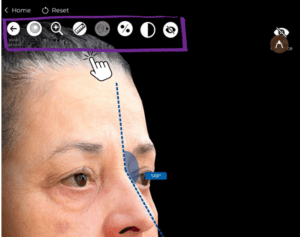
      3. Use these tools to assess facial structure, asymmetries, and proportions before making any modifications.
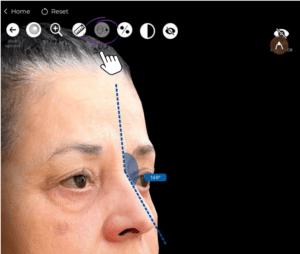
Using the Proportions Tool for Facial Symmetry #

  1. Click on the Proportions Tool to analyze facial balance.
  2. The tool highlights symmetry, golden ratio measurements, and facial angles.
  3. Adjust the proportions if needed before proceeding with simulations.
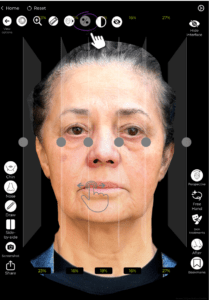
Checking the Before & After Comparison #

  1. Once modifications are applied, click the Before & After button.
  2. Toggle between the original and modified face to evaluate the changes.
  3. Use this comparison to discuss the expected results with the patient.
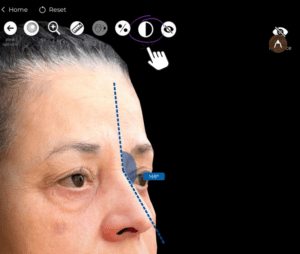
Resetting All Changes (If Needed) #

If you need to start over:

✔ Click the Reset button to revert the simulation back to the original state.
✔ This allows for new modifications without affecting the initial case study.
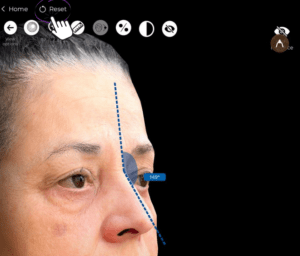
Using the Options to Simulate Facial Changes #

  1. Navigate to the Simulation Tools to begin facial modifications.
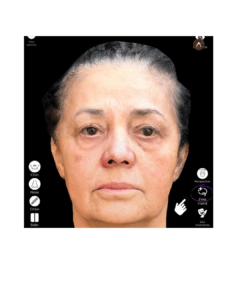
  1. Choose the specific area you want to enhance or adjust (e.g., cheeks, nose, jawline).
  2. Apply the simulation in real time to visualize the expected results.


Directly Applying Changes to Specific Areas #

  1. Select the direct modification tool to manually adjust facial features.
  2. Drag or reshape specific areas using your finger or stylus.
  3. This allows for precision control in defining facial contours.

Defining Exactly What You Want to Modify #

  1. If you want to target a specific facial feature, use the custom definition tool.
  2. Manually outline the area to be adjusted for greater accuracy.
  3. Modify based on the patient’s request or surgical plan.
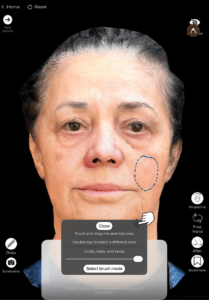
Simulating the Other Side of the Patient’s Face #

  1. If modifications are applied to one side, you can mirror them for balance.
  2. This helps in evaluating full facial harmony post-surgery.

Understanding Arbrea Face for Better Consultation Workflow #

  1. Explore all the features available to optimize your workflow.
  2. Familiarize yourself with the fast and easy simulation process.
  3. Experiment with different scenarios to improve patient engagement.

Using the Vector Tool for Enhanced Visualization #

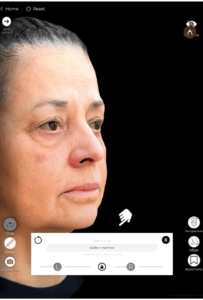
  1. The Vector Tool helps highlight and emphasize areas of change.
  2. This tool is useful for explaining volume adjustments, lifting effects, or contour changes.
  3. Use it to enhance communication with the patient about the proposed procedure.
Conclusion #

The tools in Arbrea Face simplify facial aesthetic simulations with proportion analysis, freehand modifications, and advanced visualization options. By utilizing simulation tools, the Vector Tool, and before-and-after comparisons, surgeons can enhance consultations and achieve precise pre-operative planning.

For more guidance, watch the full video tutorial below.
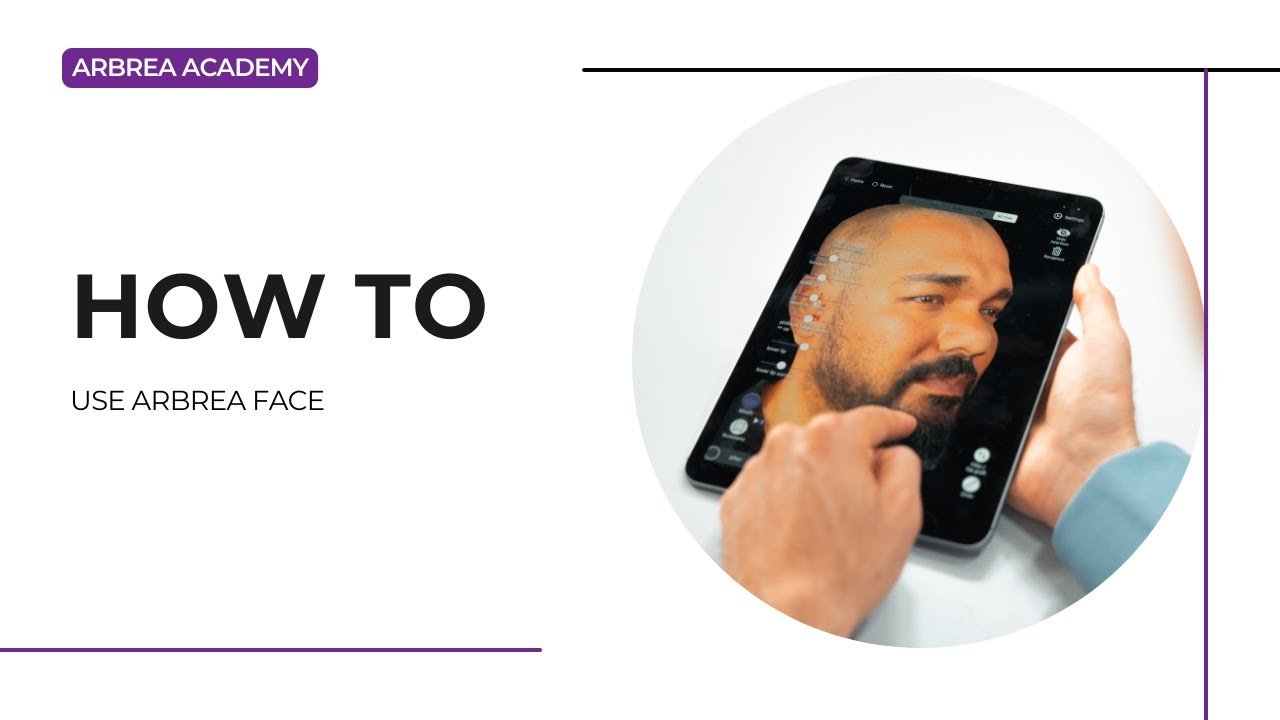
YouTube thumbnailYouTube icon

Updated on Maj 22, 2026
How to Simulate a BichectomyHow to Make a 3D Model
  • Instagram
  • LinkedIn
  • YouTube
  • Rreth Nesh
  • Qendra e Ndihmës e Arbrea
  • Karriera
  • Politika e Privatësisë
  • Imprintë
  • Kushtet e Përdorimit
  • Kontaktoni
  • Fillo Falas
  • Rezervo një demo
  • Gjiri Arbrea
  • Arbrea Face
  • Arbrea Body
  • myArbrea
  • Platforma e Kirurgëve

Ngjarjet e Ardhshme

Tet 15
15 Tetor - 18 Tetor

Takimi i Kirurgjisë Plastike 2026

Tet 27
27 Tetor - 31 Tetor

Kongresi Botëror i ISAPS 2026

Shiko kalendarin
Ne përdorim skedarë cookie (biskota) në faqen tonë të internetit për t'ju dhënë përvojën më të përshtatshme duke mbajtur mend preferencat tuaja dhe vizitat e përsëritura. Duke klikuar “Prano”, ju jepni pëlqimin tuaj për përdorimin e TË GJITHA skedarëve cookie.
Mos i shit të dhënat e mia personale.
Cilësimet e CookiesPrano
Menaxho pëlqimin

Përmbledhje e Privatësisë

Ky uebsajt përdor skedarë cookies për të përmirësuar përvojën tuaj ndërsa lundroni nëpër uebsajt. Nga këto, skedarët cookies që kategorizohen si të nevojshëm ruhen në shfletuesin tuaj pasi janë thelbësorë për funksionimin e veçorive bazë të uebsajtit. Ne përdorim gjithashtu skedarë cookies të palëve të treta që na ndihmojnë të analizojmë dhe kuptojmë se si e përdorni këtë uebsajt. Këto skedarë cookies do të ruhen në shfletuesin tuaj vetëm me pëlqimin tuaj. Ju gjithashtu keni mundësinë të hiqni dorë nga këto skedarë cookies. Por heqja dorë nga disa prej këtyre skedarëve cookies mund të ndikojë në përvojën tuaj të lundrimit.
E nevojshme
Gjithmonë i aktivizuar
Cookies-at e domosdoshme janë absolutisht të nevojshme që faqja e internetit të funksionojë siç duhet. Këto cookies sigurojnë funksionet bazë dhe veçoritë e sigurisë së faqes së internetit, në mënyrë anonime.
BiskotëKohëzgjatjaPërshkrimi
cookielawinfo-checkbox-analytics11 muajKjo cookie vendoset nga shtojca e pëlqimit të cookie-ve GDPR. Kjo cookie përdoret për të ruajtur pëlqimin e përdoruesit për cookie-t në kategorinë "Analitika".
cookielawinfo-checkbox-functional11 muajKjo skedarë cookie vendoset nga pëlqimi i cookie-ve GDPR për të regjistruar pëlqimin e përdoruesit për skedarët cookie në kategorinë "Funksionale".
cookielawinfo-checkbox-necessary11 muajKjo kuintesë vendoset nga shtojca e Pëlqimit të Kufizuar të GDPR. Kuinteta përdoret për të ruajtur pëlqimin e përdoruesit për kuintesat në kategorinë "Të nevojshme".
cookielawinfo-checkbox-others11 muajKjo skedë (cookie) vendoset nga shtojca GDPR Cookie Consent. Kjo skedë përdoret për ruajtjen e pëlqimit të përdoruesit për skedat (cookies) në kategorinë "Të tjera".
cookielawinfo-checkbox-performance11 muajKjo kookie vendoset nga shtojca e Pëlqimit të Cookie-ve GDPR. Kjo kookie përdoret për ruajtjen e pëlqimit të përdoruesit për kookiet në kategorinë "Performanca".
u_shikua_politika_e_cookies11 muajKarta është vendosur nga shtojca e Pëlqimit të Cookie-ve të GDPR dhe përdoret për të ruajtur nëse përdoruesi ka dhënë apo jo pëlqimin për përdorimin e cookies. Ajo nuk ruan asnjë të dhënë personale.
Funksional
Cookies-at funksionale ndihmojnë në kryerjen e funksioneve të caktuara, si ndarja e përmbajtjes së faqes së internetit në platformat e mediave sociale, mbledhja e reagimeve dhe veçori të tjera të palëve të treta.
Performanca
Cookies-ët e performancës përdoren për të kuptuar dhe analizuar indekset kryesore të performancës së faqes së internetit, gjë që ndihmon në ofrimin e një eksperience më të mirë përdoruesi për vizitorët.
Analitika
Cookie-t analitike përdoren për të kuptuar se si vizitorët ndërveprojnë me faqen e internetit. Këto cookie ndihmojnë në sigurimin e informacionit mbi metrikat e numrit të vizitorëve, shkallën e largimit, burimin e trafikut, etj.
Reklamë
Cookies-ë e reklamave përdoren për t'u siguruar vizitorëve reklama dhe fushata marketingu të përshtatshme. Këto cookie gjurmojnë vizitorët nëpër faqe interneti dhe mbledhin informacion për të ofruar reklama të personalizuara.
Të tjerë
Cookie-t e tjera të pakategorizuara janë ato që janë duke u analizuar dhe ende nuk janë klasifikuar në ndonjë kategori.
RUAJ & PRANO
Më në mbështetje të Logoja e CookieYes
We've detected you might be speaking a different language. Do you want to change to:
Change language to English English
Change language to Portuguese Portuguese
Change language to Italian Italian
Change language to Spanish Spanish
Change language to German German
Change language to Arabic Arabic
Change language to French French
Change language to Korean Korean
Albanian
Change language to Thai Thai
Change language to Hindi Hindi
Change Language
Close and do not switch language













