
メインコンテンツへスキップ
検索するには「Enter」キーを押すか、「ESC」キーを押して閉じます。
閉じる検索
Arbrea Labs
メニュー
  • 解決策
    • 解決策
    • 解決策
      • プラスチック外科医のために
      • 審美医向け
      • フェイシャルインジェクター用
  • 概要
    • 私たちのこと
    • 私たちのこと
      • 私たちについて
      • Arbreaヘルプ
      • キャリア
      • お問い合わせ
      • パートナー
  • 私たちが築くもの
    • 私たちが築くもの
    • 私たちが築くもの
      • アーブレア スイート
      • アーブレア・ブラスト
      • Arbrea Face
      • ARBREA BODY
      • myArbrea
      • Arbrea x Mentor
      • 外科用プラットフォーム
  • リソース
    • リソース
    • リソース
      • 出版物
      • Arbrea Blog
      • マーケティング&セールスに関するヒント
      • 新着情報
  • パートナープログラム
  • 信頼できる
  • JA
    • EN
    • ES
    • IT
    • DE
    • PT
    • AR
    • FR
    • KO
    • TH
    • HI
    • SQ
    • VI
  • 無料でお試しください
  • 外科用プラットフォーム
  • 解決策
    • 解決策
    • 解決策
      • プラスチック外科医のために
      • 審美医向け
      • フェイシャルインジェクター用
  • 概要
    • 私たちのこと
    • 私たちのこと
      • 私たちについて
      • Arbreaヘルプ
      • キャリア
      • お問い合わせ
      • パートナー
  • 私たちが築くもの
    • 私たちが築くもの
    • 私たちが築くもの
      • アーブレア スイート
      • アーブレア・ブラスト
      • Arbrea Face
      • ARBREA BODY
      • myArbrea
      • Arbrea x Mentor
      • 外科用プラットフォーム
  • リソース
    • リソース
    • リソース
      • 出版物
      • Arbrea Blog
      • マーケティング&セールスに関するヒント
      • 新着情報
  • パートナープログラム
  • 信頼できる
  • JA
    • EN
    • ES
    • IT
    • DE
    • PT
    • AR
    • FR
    • KO
    • TH
    • HI
    • SQ
    • VI
  • 無料でお試しください
  • 外科用プラットフォーム
  • Facebook
  • LinkedIn
  • YouTube
  • インスタグラム

Arbrea Suite Academy

5
  • How to Share a Case from Arbrea Suite to myArbrea
  • How to Use Arbrea Suite
  • How to Integrate Arbrea into Your Consultation
  • How to Activate Private Cloud Options
  • How to Customize Arbrea Suite to Your Brand 

Arbrea Breast Academy

22
  • How to Use Arbrea Breast – An Overview
  • How to Create a 3D Model for the Breast
  • How to Simulate in AR & 3D Mode
  • How to Use Sculpting Mode
  • How to Use the Implants Catalog
  • How to Set Up the Implant Brands
  • How to Use the Shape Tool
  • How to Use Bookmarks to Compare Different Implants
  • How to Simulate a Mastopexy With or Without Implants
  • How to Use Measurements
  • How to Use the Scars Tool
  • How to Use the Fat Grafting Tool
  • How to Share the Breast Simulation with Patients
  • How to Simulate Breast Reconstruction
  • How to Simulate Tuberous Breast
  • How to Simulate a Gynecomastia
  • How to Simulate an Implant Replacement 
  • How to Capture Complex Cases
  • How to Import a Model from myArbrea
  • How to Mirror to an External Screen
  • How to Order Implants
  • How to Simulate Asymmetries

Arbrea Face Academy

12
  • How to Use Arbrea Face
  • How to Make a 3D Model
  • How to Use the Automatic Measurements Tools
  • How to Use the New Free Hand Tool
  • How to Use the Annotation Tool for Injectables
  • How to Simulate a Rhinoplasty
  • How to Simulate a Facelift
  • How to Simulate Lip Procedures
  • How to Simulate Cheek Procedures
  • How to Share the Face Simulation with Patients
  • How to Simulate Chin Procedures
  • How to Simulate a Bichectomy

myArbrea

13
  • How to Add a myArbrea Code from Arbrea Suite
  • How to Request the Activation of myArbrea
  • How to Check Your myArbrea Analytics
  • How to Check and Contact Your myArbrea Users
  • How to Share a Case from myArbrea to Arbrea Suite
  • How to Use myArbrea
  • Why Should You Use myArbrea
  • What Are the Benefits of myArbrea to Current Users 
  • What Kind of Links You Can Include on myArbrea
  • How to Market myArbrea on Instagram and Other Media
  • How to Use myArbrea to Reduce No-Show Rate
  • How to Use myArbrea in Remote Consultations
  • How to Integrate myArbrea in Your Website

アーブレアボディ

7
  • How to Use the Fat Grafting Tool
  • How to Capture the Best Body Images for Simulation
  • How to Share the Body Simulation with Patients
  • How to Use Body Measurements
  • How can I simulate an Abdominoplasty (Tummy Tuck)?
  • How do I create a 3D Body Model?
  • How does Arbrea Body work? (Overview)
View Categories
  • ホーム
  • Docs
  • Arbrea Breast Academy
  • How to Capture Complex Cases

How to Capture Complex Cases

アーブレア スイート provides advanced tools to help plastic surgeons capture high-quality images for complex cases, ensuring accurate simulations and improved patient consultations. By following best practices for lighting, image quality, and simulation settings, surgeons can achieve precise pre-operative planning.

Capturing Quality Pictures with the Right Light #

  1. Use natural or well-balanced lighting to avoid shadows and glare.
  2. Ensure the patient’s face or body is evenly illuminated for accurate simulation results.
  3. Avoid harsh direct lights または overexposed backgrounds that may distort image details.

Why It Matters?

  • High-quality lighting ensures precise measurements and realistic simulations.
  • Reduces errors caused by poor visibility or shadows.

Ensuring the Best Quality for Simulations #

  1. Stabilize the camera – Use a tripod or steady hand to avoid blurriness.
  2. Capture images at eye level for facial cases and neutral positioning for body simulations.
  3. Use the highest resolution available to maintain detail and clarity.

Benefit:

  • Ensures more detailed and accurate AI-powered adjustments.
  • Provides better visualization for patient discussions.

Creating a New Patient File #

  1. Open アーブレア スイート and go to the tabs New Patient & Patient List.
  2. Click “Create New Patient” and input necessary details.
  3. Save the file to store patient history and simulations for future reference.
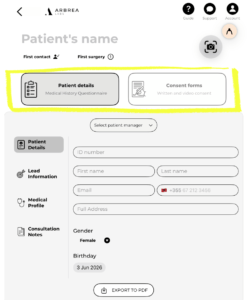
Patient's name

Advantage:

  • Keeps patient cases well-organized for easy follow-ups.
  • Allows surgeons to track simulation progress and adjustments.

Customizing the Procedure’s Settings #

  1. Select the type of procedure being simulated (e.g., facelift, breast augmentation, rhinoplasty).
  2. Adjust measurement tools, filters, and enhancement settings to match the complexity of the case.
  3. Fine-tune parameters for precise modifications.

Why It’s Important?

  • Custom settings optimize the simulation experience.
  • Helps achieve realistic pre-surgical previews.

Capturing the Patient’s Pictures for Simulation #

  1. Take frontal and profile shots for facial procedures.
  2. Capture front and angled views for body simulations.
  3. Ensure a neutral posture and expression to maintain accuracy.
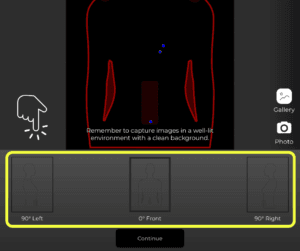
Requirements for simulations with Arbrea Suite

Benefit:

  • Provides the best foundation for AI-based simulations.
  • Enhances real-time visualizations for patient consultations.

結論 #

Capturing high-quality images for complex cases in アーブレア スイート ensures more accurate simulations, enhanced patient communication, and improved surgical planning. By utilizing proper lighting, high-resolution imaging, and customized simulation settings, surgeons can achieve precise pre-operative assessments.

For more guidance, watch the full video tutorial below.
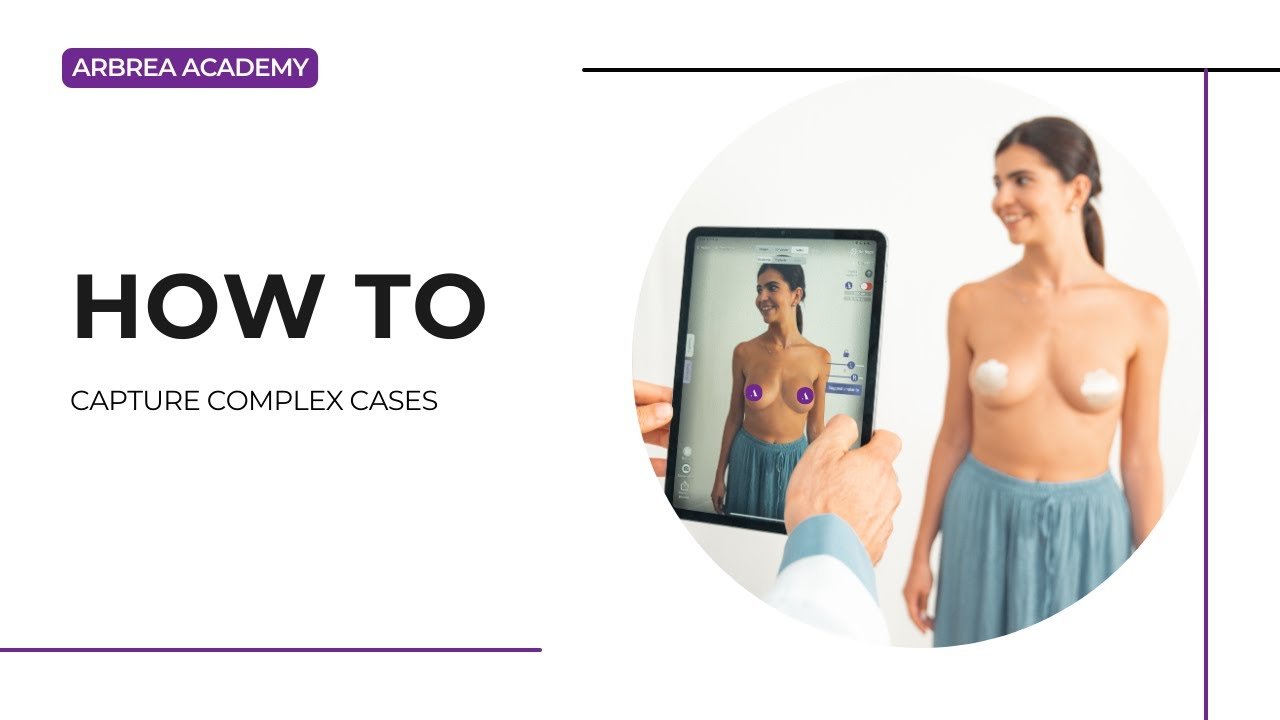
YouTube thumbnailYouTube icon

Updated on 6月 3, 2026
How to Simulate an Implant Replacement How to Import a Model from myArbrea
  • Instagram
  • LinkedIn
  • YouTube
  • 私たちについて
  • Arbrea ヘルプセンター
  • キャリア
  • プライバシーポリシー
  • 印
  • 利用規約
  • お問い合わせ
  • 無料でお試しください
  • デモを予約する
  • アーブレア・ブラスト
  • Arbrea Face
  • アーブレアボディ
  • myArbrea
  • 外科用プラットフォーム

今後のイベント

10月 15
10月15日 - 10月 18

プラスチック外科の会 2026

10月 15
10月15日 - 10月 18

XXIII Congreso Dominicano de Cirugía Plástica

カレンダーを表示
弊社はウェブサイト上でクッキーを使用し、お客様の好みを記憶し、再度訪問される際に最も適切な体験を提供します。「同意する」をクリックすると、すべてのクッキーの使用に同意したものとみなされます。.
私の個人情報を販売しないでください.
クッキーの設定受け入れる
同意の管理

プライバシーの概要

このウェブサイトは、ウェブサイトのナビゲーション中にユーザーの体験を向上させるためにクッキーを使用しています。そのうち、必要なものとして分類されるクッキーは、ウェブサイトの基本機能の正常な動作に不可欠なため、ブラウザに保存されます。また、このウェブサイトの利用状況を分析および理解するのに役立つ第三者のクッキーも使用しています。これらのクッキーは、お客様の同意なしにはお客様のブラウザに保存されることはありません。また、これらのクッキーのオプトアウトも可能です。ただし、これらのクッキーの一部をオプトアウトすると、閲覧環境に影響が生じる可能性があります。.
必要
常に有効
必須のクッキーは、ウェブサイトの正常な機能のために絶対に必要です。これらのクッキーは、匿名でウェブサイトの基本的な機能とセキュリティ機能を保証します。.
クッキー期間説明
cookielawinfo-チェックボックス分析11ヶ月このクッキーは GDPR Cookie Consent プラグインによって設定されます。このクッキーは、「分析」カテゴリのクッキーに対するユーザーの同意を保存するために使用されます。.
cookielawinfo-チェックボックス機能11ヶ月このクッキーは、GDPRのCookie同意機能により、「機能的」カテゴリのクッキーに対するユーザーの同意を記録するために設定されます。.
cookielawinfo-チェックボックス必須11ヶ月このクッキーは、GDPR Cookie Consent プラグインによって設定されます。このクッキーは、「必須」カテゴリのクッキーに対するユーザーの同意を保存するために使用されます。.
cookielawinfo-チェックボックス-その他11ヶ月このクッキーは GDPR Cookie Consent プラグインによって設定されます。このクッキーは、「その他」カテゴリのクッキーに対するユーザーの同意を保存するために使用されます。.
cookielawinfo-チェックボックスの性能11ヶ月このクッキーは、GDPR Cookie Consent プラグインによって設定されます。このクッキーは、「パフォーマンス」カテゴリのクッキーに対するユーザーの同意を保存するために使用されます。.
viewed_cookie_policy11ヶ月このクッキーは GDPR Cookie Consent プラグインによって設定され、ユーザーがクッキーの使用に同意したかどうかの保存に使用されます。このクッキーには個人データは保存されません。.
機能的
機能的なクッキーは、ソーシャルメディアプラットフォームでのウェブサイトコンテンツの共有、フィードバックの収集、およびその他のサードパーティ機能などの特定の機能の実行を支援します。.
パフォーマンス
パフォーマンスクッキーは、ウェブサイトの主要なパフォーマンス指標を理解し分析するために使用され、訪問者により良いユーザーエクスペリエンスを提供することに役立ちます。.
アナリティクス
分析型クッキーは、訪問者がウェブサイトとどのようにやり取りしているかを理解するために使用されます。これらのクッキーは、訪問者数、バウンス率、トラフィックソースなどの指標に関する情報を提供するのに役立ちます。.
広告
広告クッキーは、訪問者に関連性の高い広告やマーケティングキャンペーンを提供するために使用されます。これらのクッキーは、訪問者を複数のウェブサイトを横断して追跡し、カスタマイズされた広告を提供するために情報を収集します。.
その他
その他の未分類のクッキーは、分析中であり、まだカテゴリーに分類されていません。.
保存&承認
Powered by CookieYesのロゴ
We've detected you might be speaking a different language. Do you want to change to:
言語をEnglishに変更 English
言語をPortugueseに変更 Portuguese
言語をItalianに変更 Italian
言語をSpanishに変更 Spanish
言語をGermanに変更 German
言語をArabicに変更 Arabic
言語をFrenchに変更 French
言語をKoreanに変更 Korean
言語をAlbanianに変更 Albanian
言語をThaiに変更 Thai
言語をHindiに変更 Hindi
言語をVietnameseに変更 Vietnamese
Japanese
Change Language
Close and do not switch language















