Vượt qua đến nội dung chính
Nhấn Enter để tìm kiếm hoặc ESC để đóng
Đóng tìm kiếm
Arbrea Labs
Menu
  • Giải pháp
    • Giải pháp
    • Giải pháp
      • Đối với các bác sĩ phẫu thuật thẩm mỹ
      • Đối với các bác sĩ thẩm mỹ
      • Đối với máy tiêm da mặt
  • Giới thiệu
    • Giới thiệu về chúng tôi
    • Giới thiệu về chúng tôi
      • Giới thiệu về chúng tôi
      • Arbrea Help
      • Tuyển dụng
      • Liên hệ
      • Các đối tác
  • Những gì chúng tôi xây dựng
    • Những gì chúng tôi xây dựng
    • Những gì chúng tôi xây dựng
      • Arbrea Suite
      • Arbrea Breast
      • Arbrea Face
      • ARBREA BODY
      • myArbrea
      • Arbrea x Mentor
      • Nền tảng phẫu thuật
  • Nguồn lực
    • Nguồn lực
    • Nguồn lực
      • Sách và tài liệu
      • Blog Arbrea
      • Những lời khuyên về Marketing & Bán hàng
      • Những điều mới mẻ
  • Chương trình Đối tác
  • Tin cậy
  • VI
    • EN
    • ES
    • IT
    • DE
    • PT
    • AR
    • FR
    • KO
    • TH
    • HI
    • SQ
    • JA
  • Bắt đầu miễn phí
  • Nền tảng phẫu thuật
  • Giải pháp
    • Giải pháp
    • Giải pháp
      • Đối với các bác sĩ phẫu thuật thẩm mỹ
      • Đối với các bác sĩ thẩm mỹ
      • Đối với máy tiêm da mặt
  • Giới thiệu
    • Giới thiệu về chúng tôi
    • Giới thiệu về chúng tôi
      • Giới thiệu về chúng tôi
      • Arbrea Help
      • Tuyển dụng
      • Liên hệ
      • Các đối tác
  • Những gì chúng tôi xây dựng
    • Những gì chúng tôi xây dựng
    • Những gì chúng tôi xây dựng
      • Arbrea Suite
      • Arbrea Breast
      • Arbrea Face
      • ARBREA BODY
      • myArbrea
      • Arbrea x Mentor
      • Nền tảng phẫu thuật
  • Nguồn lực
    • Nguồn lực
    • Nguồn lực
      • Sách và tài liệu
      • Blog Arbrea
      • Những lời khuyên về Marketing & Bán hàng
      • Những điều mới mẻ
  • Chương trình Đối tác
  • Tin cậy
  • VI
    • EN
    • ES
    • IT
    • DE
    • PT
    • AR
    • FR
    • KO
    • TH
    • HI
    • SQ
    • JA
  • Bắt đầu miễn phí
  • Nền tảng phẫu thuật
  • Facebook
  • LinkedIn
  • YouTube
  • Instagram

Arbrea Suite Academy

5
  • How to Share a Case from Arbrea Suite to myArbrea
  • How to Use Arbrea Suite
  • How to Integrate Arbrea into Your Consultation
  • How to Activate Private Cloud Options
  • How to Customize Arbrea Suite to Your Brand 

Arbrea Breast Academy

22
  • How to Use Arbrea Breast – An Overview
  • How to Create a 3D Model for the Breast
  • How to Simulate in AR & 3D Mode
  • How to Use Sculpting Mode
  • How to Use the Implants Catalog
  • How to Set Up the Implant Brands
  • How to Use the Shape Tool
  • How to Use Bookmarks to Compare Different Implants
  • How to Simulate a Mastopexy With or Without Implants
  • How to Use Measurements
  • How to Use the Scars Tool
  • How to Use the Fat Grafting Tool
  • How to Share the Breast Simulation with Patients
  • How to Simulate Breast Reconstruction
  • How to Simulate Tuberous Breast
  • How to Simulate a Gynecomastia
  • How to Simulate an Implant Replacement 
  • How to Capture Complex Cases
  • How to Import a Model from myArbrea
  • How to Mirror to an External Screen
  • How to Order Implants
  • How to Simulate Asymmetries

Arbrea Face Academy

12
  • How to Use Arbrea Face
  • How to Make a 3D Model
  • How to Use the Automatic Measurements Tools
  • How to Use the New Free Hand Tool
  • How to Use the Annotation Tool for Injectables
  • How to Simulate a Rhinoplasty
  • How to Simulate a Facelift
  • How to Simulate Lip Procedures
  • How to Simulate Cheek Procedures
  • How to Share the Face Simulation with Patients
  • How to Simulate Chin Procedures
  • How to Simulate a Bichectomy

myArbrea

13
  • How to Add a myArbrea Code from Arbrea Suite
  • How to Request the Activation of myArbrea
  • How to Check Your myArbrea Analytics
  • How to Check and Contact Your myArbrea Users
  • How to Share a Case from myArbrea to Arbrea Suite
  • How to Use myArbrea
  • Why Should You Use myArbrea
  • What Are the Benefits of myArbrea to Current Users 
  • What Kind of Links You Can Include on myArbrea
  • How to Market myArbrea on Instagram and Other Media
  • How to Use myArbrea to Reduce No-Show Rate
  • How to Use myArbrea in Remote Consultations
  • How to Integrate myArbrea in Your Website

Arbrea Body

7
  • How to Use the Fat Grafting Tool
  • How to Capture the Best Body Images for Simulation
  • How to Share the Body Simulation with Patients
  • How to Use Body Measurements
  • How can I simulate an Abdominoplasty (Tummy Tuck)?
  • How do I create a 3D Body Model?
  • How does Arbrea Body work? (Overview)
Xem danh mục
  • Trang chủ
  • Docs
  • Arbrea Breast Academy
  • How to Simulate Asymmetries

How to Simulate Asymmetries

Arbrea Breast offers an intuitive and comprehensive guide on how to simulate asymmetries, enabling surgeons to accurately analyze, plan, and visualize surgical adjustments using AI-powered simulations. This guide walks you through the step-by-step process of measuring asymmetries, adjusting breast volume, selecting implants, modifying the nipple position, and visualizing surgical scars to enhance pre-operative consultations.

Selecting the Measurements #

  1. Open Arbrea Suite and select your patient’s image or 3D scan.
  2. Click on the Các phép đo tool to analyze breast volume differences.
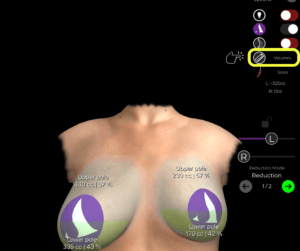
Volume Differences Arbrea Suite

   3. By clicking again, you can switch between measurement mode and volume analysis to assess the asymmetry accurately.
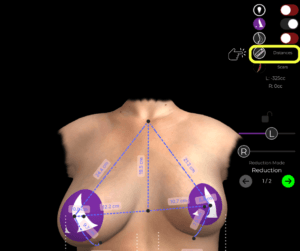
Measurement Tool Arbrea Suite

Once measurements are visible, we can move on to adjusting the volume.

Adjusting Breast Volume for Symmetry #

How to Change from Measurements to Volume Mode #

  1. Activate Volume Mode by switching from measurements đến volume settings.
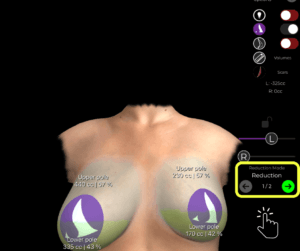
  2. The software will automatically enter Reduction Mode (Step 1), which is used for:
    • Volume reduction
    • Mastopexy (breast lift)
    • Implant replacement planning

Reduction Mode Arbrea Suite

How to Reduce the Volume of Each Breast Individually #

By default, both breasts adjust together, but asymmetry correction requires independent adjustments:

  1. Deactivate the Lock – This unlocks the ability to modify each breast separately.
  2. Reduce the right breast volume significantly.
  3. Reduce the left breast volume slightly to maintain symmetry.

Slider Lock Arbrea Suite

At this stage, the initial correction of asymmetry is complete.

Choosing the Right Implant #

Once volume correction is done, we move to Step 2, where we select implants to restore shape and projection.

Augmentation Mode Arbrea Suite

How to Choose an Implant from the Catalog #

  1. Open the Implants Catalog.
  2. Select a brand (e.g., Mentor).
  3. Filter options based on:
    • Shape (Anatomic, Round)
    • Projection (Moderate, High, Extra High)
  4. Choose an appropriate implant and apply it to the patient.
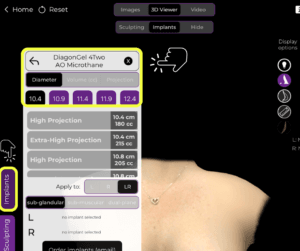
Choosing an Implant from the Catalog in Arbrea Suite

If the implant placement is not perfect, adjustments can be made using the Shape Tool.

Adjusting Implant Position and Lift #

Once the implant is applied, we can refine its position, lift, and overall symmetry.

How to Adjust the Implant and Lift #

  1. Open the Shape Tool.
  2. Use the sliders to:
    • Lift the breast for a more youthful position.
    • Increase fullness in the upper pole if needed.
    • Move the implant to ensure correct alignment.
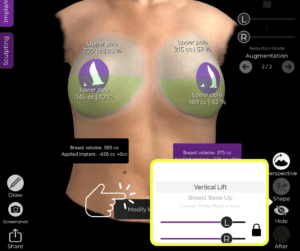
Adjust Implant With Shape Tool Arbrea Suite

After these refinements, the breast shape and symmetry are significantly improved.

Modifying the Nipples for a Natural Look #

To ensure perfect symmetry, it’s essential to reposition the Nipple-Areola Complex (NAC).

How to Adjust the Nipples #

  1. Open the NAC Tool (Nipple-Areola Complex Tool).
  2. Define the nipple size và exact target position.
  3. Adjust the positioning for natural alignment with the new breast shape.

This ensures that both nipples are positioned symmetrically, complementing the surgical plan.

Displaying Surgical Scars #

Arbrea Suite does not show scars directly, as scar healing varies. However, it provides scar indicators to give patients a general idea of where scars will be.

Scar Indicator Arbrea Suite

How to Show and Hide Scars #

  1. Open the Scars Indicator Tool to place surgical scar markers.
  2. Sử dụng Bookmark to save the results.
  3. Hide the scars if necessary to present a clean simulation to the patient.

Scar Location Modifier Arbrea Suite

This helps Đặt ra những kỳ vọng thực tế while maintaining a professional and aesthetic visualization.

Presenting the Results to the Patient #

How to Hide the Tools for a Clear Patient View #

Once you’ve finalized the simulation:

Hide unnecessary tools to focus on the results.
Lend the iPad to the patient for an interactive experience.
If needed, return to the implant selection and refine the results further.

Hide Tools to Focus on the Final Result Arbrea Suite

This ensures a smooth and engaging consultation where patients can clearly understand the before-and-after transformation.

Kết luận #

Arbrea Breast simplifies the way on how to simulate asymmetries with precise measurement analysis, volume adjustments, and implant customization. By utilizing nipple position refinements, scar visualization, and AI-powered simulations, surgeons can enhance consultations and achieve accurate pre-operative planning.

For more guidance, watch the full video tutorial below.
YouTube thumbnailYouTube icon

Cập nhật vào Tháng 3 28, 2025
How to Order ImplantsHow to Use Arbrea Breast – An Overview
Table of Contents
  • Selecting the Measurements
  • Adjusting Breast Volume for Symmetry
    • How to Change from Measurements to Volume Mode
    • How to Reduce the Volume of Each Breast Individually
  • Choosing the Right Implant
    • How to Choose an Implant from the Catalog
  • Adjusting Implant Position and Lift
    • How to Adjust the Implant and Lift
  • Modifying the Nipples for a Natural Look
    • How to Adjust the Nipples
  • Displaying Surgical Scars
    • How to Show and Hide Scars
  • Presenting the Results to the Patient
    • How to Hide the Tools for a Clear Patient View
  • Kết luận
  • Instagram
  • LinkedIn
  • Youtube
  • Giới thiệu về chúng tôi
  • Trung tâm trợ giúp Arbrea
  • Tuyển dụng
  • Chính sách bảo mật
  • Hình ảnh
  • Điều khoản sử dụng
  • Liên hệ
  • Bắt đầu miễn phí
  • Đăng ký demo
  • Arbrea Breast
  • Arbrea Face
  • Arbrea Body
  • myArbrea
  • Nền tảng phẫu thuật

Các sự kiện sắp diễn ra

Th10 15
Tháng 10 15 - Tháng 10 18

Hội nghị Phẫu thuật thẩm mỹ The Meeting 2026

Th10 15
Tháng 10 15 - Tháng 10 18

XXIII Congreso Dominicano de Cirugía Plástica

Xem Lịch
Chúng tôi sử dụng cookie trên trang web của mình để mang đến cho bạn trải nghiệm phù hợp nhất bằng cách ghi nhớ các tùy chọn và lần truy cập tiếp theo của bạn. Bằng cách nhấp vào “Chấp nhận”, bạn đồng ý với việc sử dụng tất cả cookie.
Đừng bán thông tin cá nhân của tôi.
Cài đặt cookieChấp nhận
Quản lý sự đồng ý

Tổng quan về quyền riêng tư

Trang web này sử dụng cookie để cải thiện trải nghiệm của bạn khi bạn duyệt qua trang web. Trong số đó, các cookie được phân loại là cần thiết sẽ được lưu trữ trên trình duyệt của bạn vì chúng là cần thiết để hoạt động các chức năng cơ bản của trang web. Chúng tôi cũng sử dụng cookie của bên thứ ba giúp chúng tôi phân tích và hiểu cách bạn sử dụng trang web này. Những cookie này sẽ được lưu trữ trong trình duyệt của bạn chỉ với sự đồng ý của bạn. Bạn cũng có thể chọn không tham gia một số cookie này. Tuy nhiên, việc chọn không tham gia một số cookie này có thể ảnh hưởng đến trải nghiệm duyệt web của bạn.
Cần thiết
Luôn được bật
Các cookie cần thiết là điều bắt buộc để trang web hoạt động đúng chức năng. Những cookie này đảm bảo các chức năng cơ bản và các tính năng bảo mật của trang web một cách ẩn danh.
CookieThời lượngMô tả
checkbox-cookielawinfo-analytics11 thángCookie này được thiết lập bởi plugin GDPR Cookie Consent. Cookie này được sử dụng để lưu trữ sự đồng ý của người dùng đối với cookie thuộc danh mục "Phân tích".
checkbox-cookielawinfo-hoat-dong11 thángCookie này được thiết lập bởi GDPR cookie consent để ghi lại sự đồng ý của người dùng đối với các cookie thuộc danh mục "Chức năng".
checkbox-cookielawinfo-la-bat-buoc11 thángCookie này được thiết lập bởi plugin GDPR Cookie Consent. Cookie này được sử dụng để lưu trữ sự đồng ý của người dùng đối với cookie trong danh mục "Cần thiết".
checkbox-cookielawinfo-khac11 thángCookie này được thiết lập bởi plugin GDPR Cookie Consent. Cookie này được sử dụng để lưu trữ sự đồng ý của người dùng đối với các cookie thuộc danh mục "Khác".
hieu-suat-checkbox-cookielawinfo11 thángCookie này được thiết lập bởi plugin GDPR Cookie Consent. Cookie này được sử dụng để lưu trữ sự đồng ý của người dùng đối với cookie trong danh mục "Hiệu suất".
viewed_cookie_policy11 thángCookie này được thiết lập bởi plugin GDPR Cookie Consent và được sử dụng để lưu trữ thông tin về việc người dùng đã đồng ý sử dụng cookie hay chưa. Nó không lưu trữ bất kỳ dữ liệu cá nhân nào.
Functional: Có chức năng, hoạt động tốt, thiết thực, thuộc về chức năng.
Cookie chức năng giúp thực hiện các chức năng nhất định như chia sẻ nội dung của trang web trên các nền tảng mạng xã hội, thu thập phản hồi và các tính năng của bên thứ ba khác.
Hiệu suất
Cookie hiệu suất được sử dụng để hiểu và phân tích các chỉ số hiệu suất chính của trang web, giúp mang lại trải nghiệm người dùng tốt hơn cho người dùng.
Phân tích
Cookie phân tích được sử dụng để hiểu cách người dùng tương tác với trang web. Những cookie này giúp cung cấp thông tin về các số liệu như số lượng người truy cập, tỷ lệ thoát, nguồn lưu lượng truy cập,….
Quảng cáo
Cookie quảng cáo được sử dụng để cung cấp cho khách truy cập các quảng cáo và chiến dịch marketing phù hợp. Những cookie này theo dõi khách truy cập trên các trang web và thu thập thông tin để cung cấp các quảng cáo được cá nhân hóa.
Những người khác
Các cookie không được phân loại khác là những cookie đang được phân tích và chưa được phân loại vào một danh mục nào.
LƯU & CHẤP NHẬN
Được cung cấp bởi Biểu tượng của CookieYes
We've detected you might be speaking a different language. Do you want to change to:
Chuyển sang ngôn ngữ English English
Chuyển sang ngôn ngữ Portuguese Portuguese
Chuyển sang ngôn ngữ Italian Italian
Chuyển sang ngôn ngữ Spanish Spanish
Chuyển sang ngôn ngữ German German
Chuyển sang ngôn ngữ Arabic Arabic
Chuyển sang ngôn ngữ French French
Chuyển sang ngôn ngữ Korean Korean
Chuyển sang ngôn ngữ Albanian Albanian
Chuyển sang ngôn ngữ Thai Thai
Chuyển sang ngôn ngữ Hindi Hindi
Vietnamese
Chuyển sang ngôn ngữ Japanese Japanese
Change Language
Close and do not switch language