
ข้ามไปยังเนื้อหาหลัก
กด Enter เพื่อค้นหาหรือ ESC เพื่อปิด
ปิดการค้นหา
อาร์เบรีย แล็บส์
เมนู
  • วิธีแก้ปัญหา
    • วิธีแก้ปัญหา
    • วิธีแก้ปัญหา
      • สำหรับศัลยแพทย์ตกแต่ง
      • สำหรับแพทย์ผิวหนังและความงาม
      • สำหรับผู้ฉีดสารเติมเต็มใบหน้า
  • เกี่ยวกับ
    • เกี่ยวกับเรา
    • เกี่ยวกับเรา
      • เกี่ยวกับเรา
      • ความช่วยเหลือของ Arbrea
      • อาชีพ
      • ติดต่อ
      • พาร์ทเนอร์
  • สิ่งที่เราสร้าง
    • สิ่งที่เราสร้าง
    • สิ่งที่เราสร้าง
      • อาร์เบรีย สวีท
      • หน้าอกอาร์เบรีย
      • อาร์เบีย เฟซ
      • อาร์เบรีย บอดี้
      • มายแอบรียา
      • Arbrea x Mentor
      • แพลตฟอร์มสำหรับศัลยแพทย์
  • ทรัพยากร
    • ทรัพยากร
    • ทรัพยากร
      • สิ่งพิมพ์
      • บล็อกอาร์เบรีย
      • เคล็ดลับการตลาดและการขาย
      • มีอะไรใหม่บ้าง
  • โปรแกรมพาร์ทเนอร์
  • ที่ไว้วางใจได้
  • TH
    • EN
    • ES
    • IT
    • DE
    • PT
    • AR
    • FR
    • KO
    • HI
    • SQ
  • เริ่มต้นใช้งานฟรี
  • แพลตฟอร์มสำหรับศัลยแพทย์
  • วิธีแก้ปัญหา
    • วิธีแก้ปัญหา
    • วิธีแก้ปัญหา
      • สำหรับศัลยแพทย์ตกแต่ง
      • สำหรับแพทย์ผิวหนังและความงาม
      • สำหรับผู้ฉีดสารเติมเต็มใบหน้า
  • เกี่ยวกับ
    • เกี่ยวกับเรา
    • เกี่ยวกับเรา
      • เกี่ยวกับเรา
      • ความช่วยเหลือของ Arbrea
      • อาชีพ
      • ติดต่อ
      • พาร์ทเนอร์
  • สิ่งที่เราสร้าง
    • สิ่งที่เราสร้าง
    • สิ่งที่เราสร้าง
      • อาร์เบรีย สวีท
      • หน้าอกอาร์เบรีย
      • อาร์เบีย เฟซ
      • อาร์เบรีย บอดี้
      • มายแอบรียา
      • Arbrea x Mentor
      • แพลตฟอร์มสำหรับศัลยแพทย์
  • ทรัพยากร
    • ทรัพยากร
    • ทรัพยากร
      • สิ่งพิมพ์
      • บล็อกอาร์เบรีย
      • เคล็ดลับการตลาดและการขาย
      • มีอะไรใหม่บ้าง
  • โปรแกรมพาร์ทเนอร์
  • ที่ไว้วางใจได้
  • TH
    • EN
    • ES
    • IT
    • DE
    • PT
    • AR
    • FR
    • KO
    • HI
    • SQ
  • เริ่มต้นใช้งานฟรี
  • แพลตฟอร์มสำหรับศัลยแพทย์
  • เฟซบุ๊ก
  • ลิงก์อิน
  • ยูทูบ
  • อินสตาแกรม

Arbrea Suite Academy

5
  • How to Share a Case from Arbrea Suite to myArbrea
  • How to Use Arbrea Suite
  • How to Integrate Arbrea into Your Consultation
  • How to Activate Private Cloud Options
  • How to Customize Arbrea Suite to Your Brand 

Arbrea Breast Academy

22
  • How to Use Arbrea Breast – An Overview
  • How to Create a 3D Model for the Breast
  • How to Simulate in AR & 3D Mode
  • How to Use Sculpting Mode
  • How to Use the Implants Catalog
  • How to Set Up the Implant Brands
  • How to Use the Shape Tool
  • How to Use Bookmarks to Compare Different Implants
  • How to Simulate a Mastopexy With or Without Implants
  • How to Use Measurements
  • How to Use the Scars Tool
  • How to Use the Fat Grafting Tool
  • How to Share the Breast Simulation with Patients
  • How to Simulate Breast Reconstruction
  • How to Simulate Tuberous Breast
  • How to Simulate a Gynecomastia
  • How to Simulate an Implant Replacement 
  • How to Capture Complex Cases
  • How to Import a Model from myArbrea
  • How to Mirror to an External Screen
  • How to Order Implants
  • How to Simulate Asymmetries

Arbrea Face Academy

12
  • How to Use Arbrea Face
  • How to Make a 3D Model
  • How to Use the Automatic Measurements Tools
  • How to Use the New Free Hand Tool
  • How to Use the Annotation Tool for Injectables
  • How to Simulate a Rhinoplasty
  • How to Simulate a Facelift
  • How to Simulate Lip Procedures
  • How to Simulate Cheek Procedures
  • How to Share the Face Simulation with Patients
  • How to Simulate Chin Procedures
  • How to Simulate a Bichectomy

มายแอบรียา

13
  • How to Add a myArbrea Code from Arbrea Suite
  • How to Request the Activation of myArbrea
  • How to Check Your myArbrea Analytics
  • How to Check and Contact Your myArbrea Users
  • How to Share a Case from myArbrea to Arbrea Suite
  • How to Use myArbrea
  • Why Should You Use myArbrea
  • What Are the Benefits of myArbrea to Current Users 
  • What Kind of Links You Can Include on myArbrea
  • How to Market myArbrea on Instagram and Other Media
  • How to Use myArbrea to Reduce No-Show Rate
  • How to Use myArbrea in Remote Consultations
  • How to Integrate myArbrea in Your Website

อาร์เบรีย บอดี้

7
  • How to Use the Fat Grafting Tool
  • How to Capture the Best Body Images for Simulation
  • How to Share the Body Simulation with Patients
  • How to Use Body Measurements
  • How can I simulate an Abdominoplasty (Tummy Tuck)?
  • How do I create a 3D Body Model?
  • How does Arbrea Body work? (Overview)
View Categories
  • หน้าแรก
  • Docs
  • Arbrea Breast Academy
  • How to Simulate an Implant Replacement 

How to Simulate an Implant Replacement 

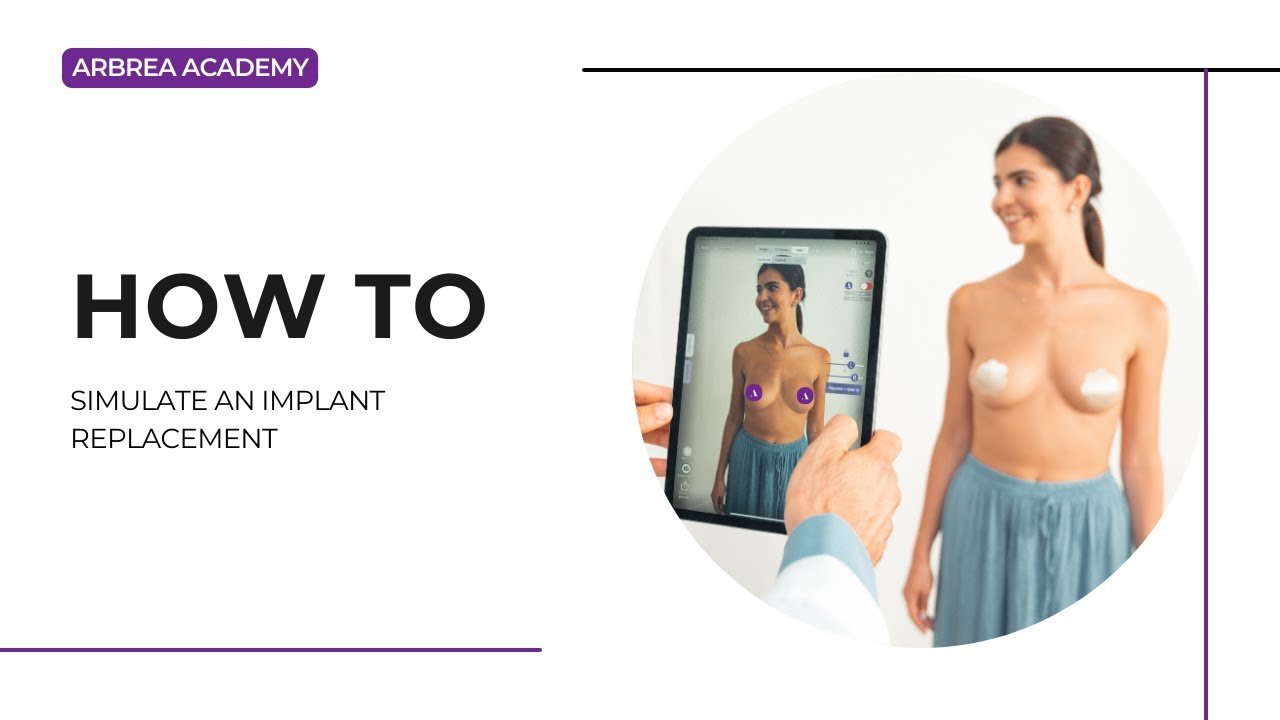
หน้าอกอาร์เบรีย provides a seamless way on how to simulate implant replacement procedures, allowing plastic surgeons to remove, replace, and adjust implants while visualizing results in real time. With tools for volume analysis, shape refinement, scar visualization, and before-and-after comparisons, this feature enhances both surgical planning and patient communication.

Viewing the Patient’s Breast Measurements #

  1. Start by opening the patient’s case in หน้าอกอาร์เบรีย.
  2. Click on the Measurement Tool to access automatic breast measurements such as base width and projection.
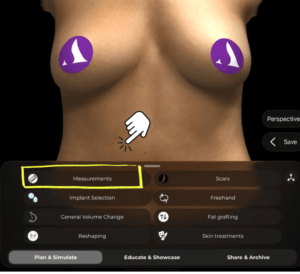
Breast Measurement

Why It’s Important:
Gives a baseline for choosing a suitable replacement implant.

Viewing the Patient’s Breast Volume #

  1. Click again to display the volume of the breast as calculated by Arbrea’s AI.

  2. This helps you determine how much existing volume needs to be removed or adjusted.
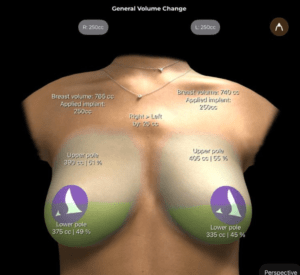
Breast Measurement

Essential for planning volume-matched implant replacements.

Removing Volume from the Breast #

  1. While in the Reduction Mode try to simulate removing the existing implant volume.

  2. Use the sliders to reduce volume precisely on one or both breasts.

  3. Unlock the breasts’ sliders if they require asymmetrical adjustments.
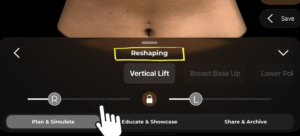
Allows you to simulate implant removal prior to selecting the replacement.

Choosing a New Implant for the Simulation #

  1. Go to the Implant Catalog and select a new implant from the available brands.

      2. Filter by volume, diameter, or projection to find the right match.

How to use Arbrea implant catalog

    3. Apply the selected implant to one or both breasts.

How to use Arbrea implant catalog

Makes it easy to compare different implant options for replacement.

Comparing Before and After Results #

  1. Use the Before/After toggle to show the changes in volume and shape.

  2. You can also use the side-by-side view or bookmark multiple options for comparison.


Enhances patient understanding and decision-making during consultations.

Viewing Scars #

  1. Open the Scars Tool to show the incision marks based on your surgical approach.

open scars tool

      2. Choose from scar types like periareolar, vertical, or inverted T depending on the procedure.
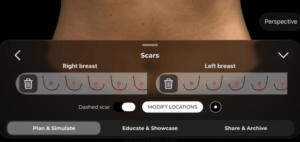
Scars tool

Helps patients visually anticipate surgical outcomes.

Adapting the Simulation with the Shape Tool #

Use the Shape Tool to fine-tune the final look:

    • Adjust lift, cleavage, projection, or breast positioning.

    • Modify based on your specific surgical technique and goals.


Adds realism and customization to the implant replacement simulation.

Conclusion #

With หน้าอกอาร์เบรีย, simulating an implant replacement is fast, intuitive, and highly customizable. From removing the old volume to selecting a new implant, adjusting shape, and showing scars, the platform empowers plastic surgeons to create realistic visualizations and confident patient consultations.

For more guidance, watch the full video tutorial below.
YouTube thumbnailYouTube icon

Updated on มิถุนายน 17, 2026
How to Simulate a GynecomastiaHow to Capture Complex Cases
  • อินสตาแกรม
  • ลิงก์อิน
  • ยูทูบ
  • เกี่ยวกับเรา
  • ศูนย์ช่วยเหลืออาร์เบรีย
  • อาชีพ
  • นโยบายความเป็นส่วนตัว
  • รอยพิมพ์
  • เงื่อนไขการใช้งาน
  • ติดต่อ
  • เริ่มต้นใช้งานฟรี
  • จองการสาธิต
  • หน้าอกอาร์เบรีย
  • อาร์เบีย เฟซ
  • อาร์เบรีย บอดี้
  • มายแอบรียา
  • แพลตฟอร์มสำหรับศัลยแพทย์

เหตุการณ์ที่จะเกิดขึ้น

ต.ค. 15
15 ตุลาคม - 18 ตุลาคม

พลาสติก เซอร์เจอรี เดอะ มีทติ้ง 2026

ต.ค. 27
27 ตุลาคม - 31 ตุลาคม

การประชุมระดับโลก ISAPS ปี 2026

ดูปฏิทิน
เราใช้คุกกี้บนเว็บไซต์ของเราเพื่อให้คุณได้รับประสบการณ์ที่ตรงกับความต้องการของคุณมากที่สุด โดยการจดจำการตั้งค่าของคุณและการเยี่ยมชมซ้ำ การคลิก “ยอมรับ” ถือว่าคุณยินยอมให้ใช้คุกกี้ทั้งหมด.
ห้ามขายข้อมูลส่วนบุคคลของฉัน.
การตั้งค่าคุกกี้ยอมรับ
จัดการความยินยอม

ภาพรวมความเป็นส่วนตัว

เว็บไซต์นี้ใช้คุกกี้เพื่อปรับปรุงประสบการณ์ของคุณในระหว่างที่คุณท่องไปในเว็บไซต์ ในจำนวนนี้ คุกกี้ที่ถูกจัดหมวดหมู่ว่าเป็นคุกกี้ที่จำเป็นจะถูกจัดเก็บไว้ในเบราว์เซอร์ของคุณ เนื่องจากมีความจำเป็นต่อการทำงานพื้นฐานของเว็บไซต์ นอกจากนี้ เรายังใช้คุกกี้ของบุคคลที่สามที่ช่วยให้เราวิเคราะห์และทำความเข้าใจว่าคุณ ใช้งานเว็บไซต์นี้อย่างไร คุกกี้เหล่านี้จะถูกเก็บไว้ในเบราว์เซอร์ของคุณเฉพาะเมื่อได้รับความยินยอมจากคุณเท่านั้น คุณยังมีตัวเลือกในการเลือกปิดการใช้งานคุกกี้เหล่านี้ได้ แต่การปิดคุกกี้บางส่วนเหล่านี้อาจส่งผลต่อประสบการณ์การท่องเว็บของคุณ.
จำเป็น
Always Enabled
คุกกี้ที่จำเป็นมีความสำคัญอย่างยิ่งต่อการทำงานอย่างถูกต้องของเว็บไซต์ คุกกี้เหล่านี้ช่วยให้มั่นใจถึงการทำงานพื้นฐานและคุณลักษณะด้านความปลอดภัยของเว็บไซต์ โดยไม่ระบุตัวตน.
CookieDurationDescription
cookielawinfo-checkbox-analytics11 เดือนคุกกี้ตัวนี้ติดตั้งโดยปลุกอิน GDPR Cookie Consent คุกกี้ดังกล่าวใช้เพื่อจัดเก็บความยินยอมของผู้ใช้สำหรับคุกกี้ในหมวดหมู่ "การวิเคราะห์".
cookielawinfo-checkbox-functional11 เดือนคุกกี้ดังกล่าวถูกกำหนดโดย GDPR Cookie Consent เพื่อบันทึกความยินยอมของผู้ใช้สำหรับคุกกี้ในหมวดหมู่ "ใช้งานทั่วไป".
cookielawinfo-checkbox-necessary11 เดือนคุกกี้ตัวนี้กำหนดโดยปลั๊กอิน GDPR Cookie Consent คุกกี้เหล่านี้ใช้เพื่อจัดเก็บความยินยอมของผู้ใช้สำหรับคุกกี้ในหมวดหมู่ "จำเป็น".
cookielawinfo-checkbox-others11 เดือนคุกกี้ตัวนี้ถูกกำหนดโดยปลั๊กอิน GDPR Cookie Consent คุกกี้ดังกล่าวใช้เพื่อจัดเก็บความยินยอมของผู้ใช้สำหรับคุกกี้ในหมวดหมู่ "อื่น ๆ".
cookielawinfo-checkbox-performance11 เดือนคุกกี้ตัวนี้กำหนดโดยปลั๊กอิน GDPR Cookie Consent คุกกี้ดังกล่าวใช้เพื่อจัดเก็บความยินยอมของผู้ใช้สำหรับคุกกี้ในหมวดหมู่ "ประสิทธิภาพ".
ดูนโยบายคุกกี้แล้ว11 เดือนคุกกี้ดังกล่าวถูกกำหนดโดยปลั๊กอิน GDPR Cookie Consent และใช้เพื่อจัดเก็บว่าผู้ใช้ยินยอมให้ใช้คุกกี้หรือไม่ คุกกี้ไม่ได้จัดเก็บข้อมูลส่วนบุคคลใดๆ.
ใช้งานได้จริง
คุกกี้สำหรับฟังก์ชันการทำงานช่วยดำเนินการฟังก์ชันบางอย่าง เช่น การแชร์เนื้อหาของเว็บไซต์บนแพลตฟอร์มโซเชียลมีเดีย การรวบรวมข้อเสนอแนะ และฟีเจอร์อื่นๆ ของบุคคลที่สาม.
ประสิทธิภาพ
คุกกี้ประสิทธิภาพใช้เพื่อทำความเข้าใจและวิเคราะห์ดัชนีชี้วัดประสิทธิภาพหลักของเว็บไซต์ ซึ่งช่วยในการมอบประสบการณ์ที่ดีกว่าแก่ผู้เยี่ยมชม.
การวิเคราะห์ข้อมูล
คุกกี้วิเคราะห์ใช้เพื่อทำความเข้าใจว่าผู้เยี่ยมชมโต้ตอบกับเว็บไซต์อย่างไร คุกกี้เหล่านี้ช่วยให้ข้อมูลเกี่ยวกับตัวชี้วัด เช่น จำนวนผู้เยี่ยมชม อัตราตีกลับ แหล่งที่มาของการเข้าชม ฯลฯ.
โฆษณา
คุกกี้โฆษณาใช้เพื่อให้ผู้เข้าชมได้รับโฆษณาและแคมเปญการตลาดที่เกี่ยวข้อง คุกกี้เหล่านี้จะติดตามผู้เข้าชมเว็บไซต์ต่างๆ และรวบรวมข้อมูลเพื่อแสดงโฆษณาที่ปรับแต่งตามความต้องการ.
อื่น ๆ
คุกกี้อื่น ๆ ที่ไม่ได้จัดหมวดหมู่คือคุกกี้ที่กำลังอยู่ในระหว่างการวิเคราะห์ และยังไม่ได้มีการจัด分类ประเภท.
SAVE & ACCEPT
Powered by โลโก้ CookieYes
We've detected you might be speaking a different language. Do you want to change to:
เปลี่ยนภาษาเป็น English English
เปลี่ยนภาษาเป็น Portuguese Portuguese
เปลี่ยนภาษาเป็น Italian Italian
เปลี่ยนภาษาเป็น Spanish Spanish
เปลี่ยนภาษาเป็น German German
เปลี่ยนภาษาเป็น Arabic Arabic
เปลี่ยนภาษาเป็น French French
เปลี่ยนภาษาเป็น Korean Korean
เปลี่ยนภาษาเป็น Albanian Albanian
Thai
เปลี่ยนภาษาเป็น Hindi Hindi
Change Language
Close and do not switch language













