メインコンテンツへスキップ
検索するには「Enter」キーを押すか、「ESC」キーを押して閉じます。
閉じる検索
Arbrea Labs
メニュー
  • 解決策
    • 解決策
    • 解決策
      • プラスチック外科医のために
      • 審美医向け
      • フェイシャルインジェクター用
  • 概要
    • 私たちのこと
    • 私たちのこと
      • 私たちについて
      • Arbreaヘルプ
      • キャリア
      • お問い合わせ
      • パートナー
  • 私たちが築くもの
    • 私たちが築くもの
    • 私たちが築くもの
      • アーブレア スイート
      • アーブレア・ブラスト
      • Arbrea Face
      • ARBREA BODY
      • myArbrea
      • Arbrea x Mentor
      • 外科用プラットフォーム
  • リソース
    • リソース
    • リソース
      • 出版物
      • Arbrea Blog
      • マーケティング&セールスに関するヒント
      • 新着情報
  • パートナープログラム
  • 信頼できる
  • JA
    • EN
    • ES
    • IT
    • DE
    • PT
    • AR
    • FR
    • KO
    • TH
    • HI
    • SQ
    • VI
  • 無料でお試しください
  • 外科用プラットフォーム
  • 解決策
    • 解決策
    • 解決策
      • プラスチック外科医のために
      • 審美医向け
      • フェイシャルインジェクター用
  • 概要
    • 私たちのこと
    • 私たちのこと
      • 私たちについて
      • Arbreaヘルプ
      • キャリア
      • お問い合わせ
      • パートナー
  • 私たちが築くもの
    • 私たちが築くもの
    • 私たちが築くもの
      • アーブレア スイート
      • アーブレア・ブラスト
      • Arbrea Face
      • ARBREA BODY
      • myArbrea
      • Arbrea x Mentor
      • 外科用プラットフォーム
  • リソース
    • リソース
    • リソース
      • 出版物
      • Arbrea Blog
      • マーケティング&セールスに関するヒント
      • 新着情報
  • パートナープログラム
  • 信頼できる
  • JA
    • EN
    • ES
    • IT
    • DE
    • PT
    • AR
    • FR
    • KO
    • TH
    • HI
    • SQ
    • VI
  • 無料でお試しください
  • 外科用プラットフォーム
  • Facebook
  • LinkedIn
  • YouTube
  • インスタグラム

アーブレア スイート アカデミー

5
  • Arbrea SuiteからmyArbreaにケースを共有する方法
  • Arbrea Suiteの使い方
  • Arbreaをコンサルティングに組み込む方法
  • プライベートクラウドオプションの有効化方法
  • Arbrea Suiteをブランドに合わせてカスタマイズする方法 

アーブレア・ブラスト・アカデミー

22
  • Arbrea Breastの使用方法 – 概要
  • 乳房の3Dモデルを作成する方法
  • ARおよび3Dモードでのシミュレーション方法
  • 彫刻モードの使い方
  • インプラントカタログの使い方
  • インプラントブランドの設定方法
  • シェイプツールの使い方
  • ブックマークを使用して異なるインプラントを比較する方法
  • インプラントを付けても、付けていない場合でもマストペクシスのシミュレーション方法
  • 測定方法
  • 傷跡ツールの使い方
  • 脂肪移植ツールの使い方
  • 患者と乳房シミュレーションを共有する方法
  • 乳房再建のシミュレーション方法
  • 乳房の塊状化をシミュレートする方法
  • 女性型乳房肥大をシミュレートする方法
  • インプラントの取り換えをシミュレートする方法 
  • 複雑なケースを把握する方法
  • myArbreaからモデルをインポートする方法
  • 外部画面にミラーリングする方法
  • インプラントの注文方法
  • 不均衡をシミュレートする方法

アーブレア・フェイス・アカデミー

12
  • Arbrea Faceの使い方
  • 3Dモデルを作る方法
  • 自動測定ツールを使用する方法
  • 新しい「手描きツール」の使い方
  • 注射剤用の注釈ツールの使い方
  • 鼻整形をシミュレートする方法
  • フェイシャルリフトをシミュレートする方法
  • リップの施術をシミュレートする方法
  • チーク手術のシミュレーション方法
  • 患者と顔のシミュレーションを共有する方法
  • チン形成の手術をシミュレートする方法
  • ビケクトミーのシミュレーション方法

myArbrea

13
  • Arbrea Suite から myArbrea コードを追加する方法
  • myArbreaの有効化のリクエスト方法
  • myArbrea Analyticsの確認方法
  • myArbreaユーザーの確認と連絡方法
  • myArbreaからArbrea Suiteにケースを共有する方法
  • myArbreaの使い方
  • なぜmyArbreaを使用すべきか
  • myArbrea のメリットは現在のユーザーにどのようなものですか? 
  • myArbreaにどのようなリンクを掲載できますか
  • Instagramやその他のメディアでmyArbreaをどのように宣伝するか
  • No-Show率を下げるためにmyArbreaの使い方
  • リモートコンサルテーションでのmyArbreaの使用方法
  • myArbreaをあなたのウェブサイトに統合する方法

アーブレアボディ

7
  • 脂肪移植ツールの使い方
  • シミュレーションで最高のボディ画像を取得する方法
  • 患者と体シミュレーションを共有する方法
  • 体の測定方法
  • 腹部形成術(タム・タック)をシミュレートするにはどうすればよいですか?
  • 3Dボディモデルを作成するにはどうすればよいですか?
  • Arbrea Body はどのように機能しますか?(概要)
カテゴリーを表示
  • ホーム
  • ドキュメント
  • アーブレア・ブラスト・アカデミー
  • 乳房の塊状化をシミュレートする方法

乳房の塊状化をシミュレートする方法

シミュレーション tuberous breast correction requires careful consideration of breast asymmetry, volume differences, and surgical planning. アーブレア・ブラスト offers a complete workflow to support this, allowing surgeons to visualize correction steps such as volume reduction, implant placement, shape refinement, NAC repositioning, 、および scar simulation—all with real-time feedback.

Using the Measurements Tool #

  1. 開いてください 測定ツール to analyze:

    • Base width

    • Breast projection

    • Asymmetries and volume discrepancies

Measurements tool for tuberous breast in Arbrea Suite

      2. Click again to access volume analytics, which are automatically calculated by the system.
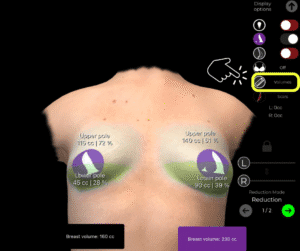
Volume analytics for tuberous breast in Arbrea Suite

なぜ重要なのか:
Gives a clear overview of structural differences in tuberous breast cases and serves as the baseline for planning.

Reducing Volume in One Breast #

  1. If one breast has significantly more volume, go to 削減モード.

  2. Unlock the symmetry to reduce only one breast independently.
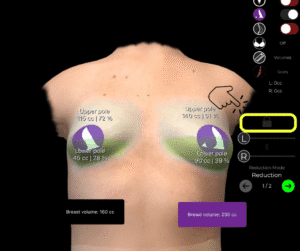
Unlock the volume slider for tuberous breast in Arbrea Suite

      3. Use the sliders to fine-tune the reduction.
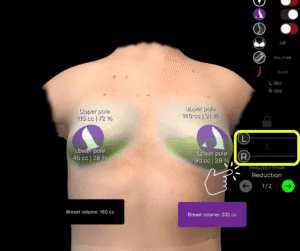
Use the volume sliders for tuberous breast in Arbrea Suite

Helps simulate corrective surgery and volume balancing for asymmetrical cases.

カタログからインプラントを選択する #

  1. After going to the Augmentation Mode, open the Implant Catalog to select an appropriate implant.

  2. Filter by brand, shape, projection, and diameter.

  3. Apply the implant to one or both breasts depending on the correction needed.
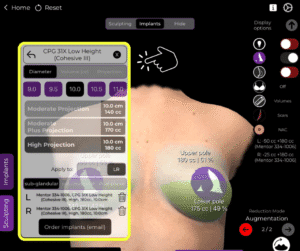
Choose the right implant in the implant catalog for tuberous breast in Arbrea Suite

Adds structure and support, which is key in tuberous breast reconstruction.

Refining the Simulation with the Shape Tool #

  1. 「use」を シェイプツール to adjust the overall appearance, including:

    • Vertical lift

    • Base width expansion

    • Lower pole shaping

Use the shape tool for tuberous breast in Arbrea Suite

     2. Modify projection and placement to simulate the final desired outcome.
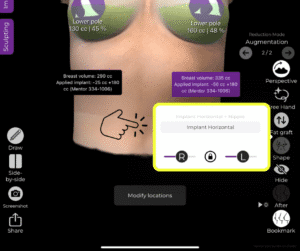
Adjust using the shape tool for tuberous breast in Arbrea Suite

Allows surgeons to visualize the aesthetic corrections in detail.

Using the NAC (Nipple Areola Complex) Tool #

  1. 開いてください NAC Tool to reposition or resize the nipple-areola complex.

  2. Define both the source (current position) そして target (new, surgically planned position).

  3. Adjust size for a symmetrical and proportional look.
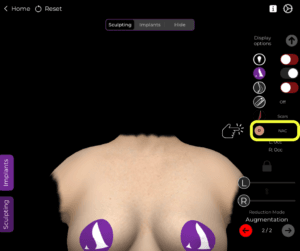
How to Use the NAC Tool in Arbrea Suite

Essential in tuberous breast correction, where areola positioning often needs adjustment.

Using the Scars Tool #

  1. Activate the Scars Tool to show expected scar patterns.
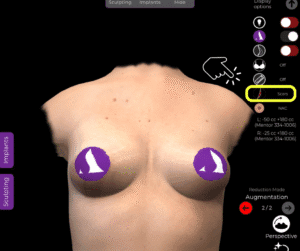
Use the scar tool for tuberous breast in Arbrea Suite

      2. Choose from periareolar, vertical (lollipop), or inverted T (anchor) scar types.
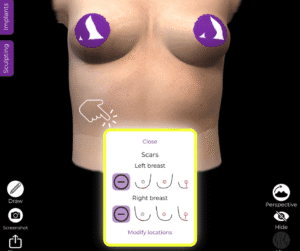
Use the right scar with the scar tool for tuberous breast in Arbrea Suite

患者さんの役に立つ understand the extent and location of post-surgical scars.

Saving and Comparing with the Bookmark Tool #

  1. 「use」を Bookmark Tool to save different versions of the simulation.

  2. You can create bookmarks to compare:

    • Different implant sizes

    • Before vs. after reduction

    • Shape refinements

Bookmark and compare the simulations in Arbrea Suite

Makes it easier to present multiple options and guide patient decisions.

結論 #

シミュレーション tuberous breast correction ~と一緒に アーブレア・ブラスト is precise and comprehensive. From analyzing asymmetries そして adjusting volumes, to choosing implants, refining the shape, 、および visualizing scars, the platform equips surgeons with the tools needed for accurate planning and effective patient consultations.

詳しいガイドについては、こちらをご覧ください。 完全な動画チュートリアル 以下.
YouTubeのサムネイルYouTubeのアイコン

更新日: 2025年10月30日
乳房再建のシミュレーション方法女性型乳房肥大をシミュレートする方法
目次
  • Using the Measurements Tool
  • Reducing Volume in One Breast
  • カタログからインプラントを選択する
  • Refining the Simulation with the Shape Tool
  • Using the NAC (Nipple Areola Complex) Tool
  • Using the Scars Tool
  • Saving and Comparing with the Bookmark Tool
  • 結論
  • Instagram
  • LinkedIn
  • YouTube
  • 私たちについて
  • Arbrea ヘルプセンター
  • キャリア
  • プライバシーポリシー
  • 印
  • 利用規約
  • お問い合わせ
  • 無料でお試しください
  • デモを予約する
  • アーブレア・ブラスト
  • Arbrea Face
  • アーブレアボディ
  • myArbrea
  • 外科用プラットフォーム

今後のイベント

10月 15
10月15日 - 10月 18

プラスチック外科の会 2026

10月 15
10月15日 - 10月 18

XXIIIドンリカン・ド・クリニカル・プラシタ(ドミニカ共和国)

カレンダーを表示
弊社はウェブサイト上でクッキーを使用し、お客様の好みを記憶し、再度訪問される際に最も適切な体験を提供します。「同意する」をクリックすると、すべてのクッキーの使用に同意したものとみなされます。.
私の個人情報を販売しないでください.
クッキーの設定受け入れる
同意の管理

プライバシーの概要

このウェブサイトは、ウェブサイトのナビゲーション中にユーザーの体験を向上させるためにクッキーを使用しています。そのうち、必要なものとして分類されるクッキーは、ウェブサイトの基本機能の正常な動作に不可欠なため、ブラウザに保存されます。また、このウェブサイトの利用状況を分析および理解するのに役立つ第三者のクッキーも使用しています。これらのクッキーは、お客様の同意なしにはお客様のブラウザに保存されることはありません。また、これらのクッキーのオプトアウトも可能です。ただし、これらのクッキーの一部をオプトアウトすると、閲覧環境に影響が生じる可能性があります。.
必要
常に有効
必須のクッキーは、ウェブサイトの正常な機能のために絶対に必要です。これらのクッキーは、匿名でウェブサイトの基本的な機能とセキュリティ機能を保証します。.
クッキー期間説明
cookielawinfo-チェックボックス分析11ヶ月このクッキーは GDPR Cookie Consent プラグインによって設定されます。このクッキーは、「分析」カテゴリのクッキーに対するユーザーの同意を保存するために使用されます。.
cookielawinfo-チェックボックス機能11ヶ月このクッキーは、GDPRのCookie同意機能により、「機能的」カテゴリのクッキーに対するユーザーの同意を記録するために設定されます。.
cookielawinfo-チェックボックス必須11ヶ月このクッキーは、GDPR Cookie Consent プラグインによって設定されます。このクッキーは、「必須」カテゴリのクッキーに対するユーザーの同意を保存するために使用されます。.
cookielawinfo-チェックボックス-その他11ヶ月このクッキーは GDPR Cookie Consent プラグインによって設定されます。このクッキーは、「その他」カテゴリのクッキーに対するユーザーの同意を保存するために使用されます。.
cookielawinfo-チェックボックスの性能11ヶ月このクッキーは、GDPR Cookie Consent プラグインによって設定されます。このクッキーは、「パフォーマンス」カテゴリのクッキーに対するユーザーの同意を保存するために使用されます。.
viewed_cookie_policy11ヶ月このクッキーは GDPR Cookie Consent プラグインによって設定され、ユーザーがクッキーの使用に同意したかどうかの保存に使用されます。このクッキーには個人データは保存されません。.
機能的
機能的なクッキーは、ソーシャルメディアプラットフォームでのウェブサイトコンテンツの共有、フィードバックの収集、およびその他のサードパーティ機能などの特定の機能の実行を支援します。.
パフォーマンス
パフォーマンスクッキーは、ウェブサイトの主要なパフォーマンス指標を理解し分析するために使用され、訪問者により良いユーザーエクスペリエンスを提供することに役立ちます。.
アナリティクス
分析型クッキーは、訪問者がウェブサイトとどのようにやり取りしているかを理解するために使用されます。これらのクッキーは、訪問者数、バウンス率、トラフィックソースなどの指標に関する情報を提供するのに役立ちます。.
広告
広告クッキーは、訪問者に関連性の高い広告やマーケティングキャンペーンを提供するために使用されます。これらのクッキーは、訪問者を複数のウェブサイトを横断して追跡し、カスタマイズされた広告を提供するために情報を収集します。.
その他
その他の未分類のクッキーは、分析中であり、まだカテゴリーに分類されていません。.
保存&承認
Powered by CookieYesのロゴ
We've detected you might be speaking a different language. Do you want to change to:
言語をEnglishに変更 English
言語をPortugueseに変更 Portuguese
言語をItalianに変更 Italian
言語をSpanishに変更 Spanish
言語をGermanに変更 German
言語をArabicに変更 Arabic
言語をFrenchに変更 French
言語をKoreanに変更 Korean
言語をAlbanianに変更 Albanian
言語をThaiに変更 Thai
言語をHindiに変更 Hindi
言語をVietnameseに変更 Vietnamese
Japanese
Change Language
Close and do not switch language